Nevada County
Local Resources
- The County of Nevada Nonprofit monthly office equipment giveaway. They computer equipment as well as office supplies and furniture. Last Friday of the month at the stoplight warehouse.
- Briar patch has several programs for nonprofits: https://briarpatch.coop/giving-back/
- Connect with United Way NC https://uwnc.org/become-a-uwnc-partner
- Local Volunteer Center
 : A resource for finding volunteer opportunities in your local community. People are looking for ways to give back to their community and make a positive impact, some may consider checking out their local volunteer center. These organizations provide a wealth of resources and opportunities for volunteers, including information on local volunteer opportunities, resources for volunteer management and coordination, and training and support for volunteers. To find your local volunteer center, simply search online for “local volunteer center” followed by the name of your city or region.
Regional Resources
- eScript for local donations at Grocery Stores www.escrip.com
- CVS grant for giftcards for nonprofits https://www.cvshealth.com/social-responsibility/our-giving
- Home depot project grants for nonprofits (gift cards) https://corporate.homedepot.com/page/home-depot-foundation
- Foundation Directory Online
 : Free access from your local library.
A database of foundations and grants, available for free through many libraries. Foundation Directory Online is a comprehensive database of foundations and grants, providing valuable information on funding opportunities for nonprofits. This resource is available for free through many libraries, providing organizations with a convenient and affordable way to research funding opportunities and plan their fundraising strategies. To learn more about Foundation Directory Online and how it can help your nonprofit, visit https://fdo.foundationcenter.org/. candid?
Online resources
This is not an exhaustive list, nor is it sorted in any particular order. Although, the ones at the top are more generally useful to the nonprofit. Many of them use techsoup.org to verify nonprofit eligibility.
Technology Help
- Online Impacts – a 501(c)(3) nonprofit organization that develops/hosts websites, provides digital marketing guidance, and creates technology solutions for impact-based nonprofits – https://onlineimpacts.org/ – Online Impacts is a great resource for nonprofits looking to maximize their impact. They offer comprehensive web development, marketing, and tech solutions to help organizations create meaningful change.
- NTEN – technology resources for nonprofits – https://www.nten.org/ – NTEN is a nonprofit that provides technology resources, best practices, and training for nonprofits to help them use technology more effectively. They also offer free webinars, conferences, and other events for nonprofits to learn and network.
- Idealware – tech training for nonprofits – http://idealware.org/ – Idealware provides tech training and resources specifically tailored for nonprofits, making it a great way for organizations to stay up to date on the latest tech tools.
- Nonprofit Tech for Good An informative blog with easy-to-understand information, news, and resources related to nonprofit technology, online communications, and social and mobile fundraising. https://www.nptechforgood.com/about-nonprofit-tech-for-good/
- Whole Whale
 : A nonprofit digital consultancy with resources and expertise available for free. Whole Whale is a nonprofit digital consultancy that provides a range of resources and expertise to organizations looking to maximize their impact through technology. From website design and development to data analysis and strategy, Whole Whale provides nonprofits with the tools and support they need to succeed in the digital age. And the best part? Their resources and expertise are available for free. To learn more about Whole Whale and how they can help your nonprofit, visit https://wholewhale.com/.
- Techsoup – discounted software – https://www.techsoup.org/ – Techsoup is a great resource for nonprofits looking to save money on technology. They offer discounted software licenses and hardware, as well as training and other resources to help nonprofits succeed.
Hardware
- Good360 – donated goods for nonprofits – https://good360.org/ – Good360 is an organization that provides nonprofits with donated goods such as school supplies, clothes, baby items, computers, etc. Their service is free for qualifying nonprofits, and a great way for organizations to get the items they need to succeed.
- ConnectAll – technology for nonprofits and people with low income – https://connectall.org/ – ConnectAll is a great resource for nonprofits and people with low incomes, offering discounted access to technology resources.
Cloud Services
- Google – https://www.google.com/nonprofits/
- Google Workspace for Nonprofits – free productivity suite -https://www.google.com/nonprofits/offerings/workspace/ – Google Workspace for Nonprofitsis a suite of tools designed to help nonprofits collaborate, communicate, and get work done more efficiently. It includes tools like Gmail, Drive, Calendar, Hangouts, and more.
- Google Ad Grants – free online advertising – https://www.google.com/grants/ – Google Ad Grants is a free online advertising program that helps nonprofits reach new audiences. It provides free ad credits that can be used to promote the organization’s website and message.
- Youtube Nonprofit Program – https://www.google.com/nonprofits/offerings/youtube-nonprofit-program/ – Engage your supporters using video with the YouTube Nonprofit Program. Unlock the power of video storytelling, so you can reach a global audience and amplify your cause. Plus, make it easy for supporters to give with YouTube Giving features (currently available in the U.S.).
- Google Earth Nonprofit – https://www.google.com/nonprofits/offerings/google-earth-and-maps/ – Google for Nonprofits provides Google Maps Platform credits to nonprofits. Show your nonprofit’s impact with Google Earth and Maps. Develop compelling data visualizations to track and share your organization’s impact. Plus, use Google Maps Platform to help people locate community programs and resources closest to them.
- Microsoft
- Office 365 for Nonprofits – productivity suite – https://www.microsoft.com/en-us/nonprofits – Microsoft Office 365 offer a variety of tools and resources to help nonprofits stay productive and efficient.
- Azure for Nonprofits – https://www.microsoft.com/en-us/nonprofits/offers-for-nonprofits – Leverage $3,500 (USD) Azure services credits per year and access the complete portfolio of Azure products and cloud services. Sign up for the Nonprofit Azure Onboarding Concierge and Success Center to set up your credits.
- Canva for Nonprofits – https://www.canva.com/canva-for-nonprofits/– Canva for Nonprofits is a free design tool that allows nonprofits to create beautiful visuals for websites, social media, and other marketing materials.
- Slack for Nonprofits – https://slack.com/nonprofit – Slack is a great way for teams to communicate and collaborate in real-time. Slack for Nonprofits provides additional features and discounts to help nonprofits stay connected.
- Asana for Nonprofits – https://asana.com/nonprofits – Asana is a great tool for project management and task organization. Asana for Nonprofits provides discounts and additional features to help nonprofits stay organized.
- Cloudflare – https://www.cloudflare.com/ – Cloudflare provides reliable and secure web services to nonprofits of all sizes, making it easier for them to reach their audiences and expand their reach online. With its free plan, nonprofits can use a range of services to boost their online presence, including enhanced security, faster page loading times, and improved performance
- Box.org – free cloud storage for nonprofits – https://www.box.com/industries/non-profit – Box.org provides free cloud storage for nonprofits. It’s a great way for nonprofits to securely store, share,and access data, documents, and other files.
- CivicChamps – managing volunteers – https://www.civicchamps.com/ – CivicChamps is a great way for nonprofits to recruit, manage, and track volunteers. It offers 50% off to help nonprofits save money.
- Dreamhost – web host provider – https://www.dreamhost.com/ – Dreamhost is a web host provider that offers free shared website and email hosting for nonprofits. It’s a great way for organizations to save money on web hosting costs.
- eBay – waives selling fees for Nonprofits – https://charity.ebay.com/for-nonprofits/ – eBay waives their selling fees for nonprofits, making it an easy and cost-effective way to raise money for causes.
- T-Mobile Network – unlimited Internet 4G WiFi Hotspot for nonprofits for $10/month with $18 for hotspot device – www.mobilebeacon.org/ – The T-Mobile Network offers unlimited 4G internet for nonprofits at a discounted price of $10/month and $18 for a hotspot device.
- PayPal Giving Fund – donations for nonprofits – https://www.paypal.com/us/webapps/mpp/donations – PayPal Giving Fund is a great way for nonprofits to receive donations from PayPal users. It’s a free service that makes donating easy and secure.
- Facebook Fundraisers – donations for nonprofits – https://www.facebook.com/fundraisers – Facebook Fundraisers are a great way for nonprofits to reach a larger audience and raise money for their cause. They provide an easy and secure way for users to donate to their favorite nonprofits.
- Salesforce Nonprofit Cloud – free CRM software – https://www.salesforce.org/nonprofit – Salesforce Nonprofit Cloud is a free Customer Relationship Management (CRM) software designed to help nonprofits build better relationships with their donors and supporters.
- GitHub Nonprofit Program – free developer tools – https://socialimpact.github.com/ – GitHub Nonprofit Program provides free developer tools and services to help nonprofits build software and manage projects.
- MailChimp
 : An email marketing platform with a free plan for nonprofits. Mailchimp offers a range of features including email design templates, automation, and analytics. Nonprofits can send up to 12,000 emails to 2,000 subscribers per month for free. Check it out at: https://mailchimp.com/
- Hubspot
 : A comprehensive marketing, sales, and customer service platform with a free nonprofit plan. Hubspot offers a range of features including website builder, email marketing, and a CRM. Nonprofits can access all the tools for free, with no time limits or restrictions. Learn more at: https://www.hubspot.com/
- Buffer
 : A social media management tool with a free plan for nonprofits. Buffer allows nonprofits to schedule, publish, and analyze posts on multiple social media platforms from one place. Nonprofits can access the basic plan for free, including support for three social media profiles. Get started at: https://buffer.com/
- Otter.ai
 : An AI-powered tool for transcribing and recording meetings, available for free to nonprofits. Otter.ai uses AI to transcribe and organize audio and video recordings in real-time. Nonprofits can access 600 minutes of transcription per month for free. Find out more at: https://otter.ai/
- Givelively : A fundraising platform that is free for nonprofits to use. Givelively offers a range of features including online fundraising pages, donation processing, and donor management. Nonprofits can use the platform for free, with no transaction fees or hidden costs. Get started at: https://www.givelively.org/
- Mobilize
 : A platform for organizing volunteer events and campaigns, available for free to nonprofits. Mobilize makes it easy for nonprofits to recruit, manage, and mobilize volunteers. Nonprofits can use the platform for free, with no limits on the number of volunteers or events. Sign up at: https://mobilize.us/
- LinkedIn : A professional networking platform with a free nonprofit account. LinkedIn is a platform designed for professional networking, connecting millions of professionals from around the world. Nonprofits can take advantage of LinkedIn’s free nonprofit account, which provides access to a wealth of resources and tools to help organizations build their online presence and connect with potential supporters, partners, and collaborators. To learn more about the free nonprofit account offered by LinkedIn, visit https://business.linkedin.com/non-profits.
- ClickUp
 : A project management tool with a free plan for nonprofits.ClickUp is a comprehensive project management tool that can help organizations of all sizes streamline their workflows and collaborate more effectively. The tool is available for free to nonprofits, offering a range of features and tools to help organizations stay organized and on track, including task management, project tracking, and team collaboration. To learn more about ClickUp and how it can help your nonprofit, visit https://clickup.com/.
- Webflow
 : A website design and development platform that offers a free plan for nonprofits. With Webflow, nonprofits can create beautiful, functional websites without having to write code. Nonprofits can take advantage of Webflow’s intuitive design tools, extensive design library, and customizable templates to create a website that meets their unique needs. To get started with Webflow, visit https://webflow.com/
- Codesandbox
 : A code editor and development environment that is available for free to nonprofits. Codesandbox provides a collaborative environment for developers to create and test their code, making it easier for nonprofits to build and maintain their websites and applications. To access Codesandbox, go to https://codesandbox.io/
- Twilio.org – https://twilio.org
Twilio offers free and discounted access for nonprofits to it’s powerful SMS and messaging platform. They are a proud member of the Pledge 1% for companies, redirecting 1% of their profit to social impact. They also run an annual impact fund for funding direct ideas in the community using SMS. More about this on our podcast with Twilio.org. - Okta Cloud-based identity management platform for nonprofits. Okta offers a discount to eligible nonprofits, providing up to 50 free licenses for their identity management.platform.https://www.okta.com/nonprofits/
- Loom
 : A screen and camera recording tool with a free plan for nonprofits. Loom is a screen and camera recording tool that makes it easy to capture and share video content with others. The tool is available for free to nonprofits, providing organizations with a convenient and affordable way to create and share videos for a variety of purposes, including fundraising, marketing, and community engagement. To learn more about Loom and how it can help your nonprofit, visit https://www.loom.com/.
- GrantAdviser – a safe way to anonymously give and receive feedback on grantmaking – https://grantadvisor.org/ – GrantAdviser is a platform that allows nonprofits to review and rate their grantmaking experiences. It provides a safe and anonymous environment to share experiences and feedback that can help other organizations.
- Charity Navigator is a nonprofit that rates charities in the US based on financial health, accountability, and transparency. Their rating system uses one to four stars. They also offer resources for donors and a paid service for personalized giving recommendations. Visit their website at: https://www.charitynavigator.org/
You don’t pay taxes on communication services if you are certain type of nonprofit.
Other ideas
ewaste drives
Further reading
https://www.idealist.org/en/fundraising-resources/free-or-low-cost-services
]]>
National Broadband Map
The new Broadband Map website maintained by the Federal Communications Commission (FCC) is an online tool that allows users to search and compare broadband internet availability and speeds at their specific address. The website provides a wealth of information related to broadband connectivity, including information on broadband providers, types of service available, and connection speeds. Be sure to dispute any carrier that is on this map, but can’t provide you service. Be sure to check that out: https://broadbandmap.fcc.gov/home
NEWSFLASH
https://www.nevadacountyca.gov/CivicAlerts.aspx?AID=6430
 Great news for residents of Nevada County, California! The county is set to streamline compliance with the California Environmental Quality Act (CEQA) to remove barriers and accelerate broadband development, with the final environmental impact report set to be presented before the Board of Supervisors on 28 February. The countywide report, available from 10 February, aims to speed up the granting of federal and state funds to individual fibre projects. The county said construction of the latter could start as early as spring 2023.
 For those interested in accessing the programmatic FEIR, it can be found on the Nevada County Community Development Agency’s website at https://www.nevadacountyca.gov/513/Projects-Supporting-Documents. The PDF report can be directly accessed at https://www.nevadacountyca.gov/DocumentCenter/View/47183/Broadband-Program-Final-Environmental-Impact-Report.
 To stay informed on the latest broadband news, residents can sign up for the Broadband in Nevada County Newsletter at https://www.mynevadacounty.com/broadband. For any questions, concerns, or opportunities to bring service to undeserved areas, connect with the county via email at [email protected].

FREE INTERNET for people with low income
The FCC launched a new program called the Affordable Connectivity Program (ACP) on December 31, 2021. The ACP is a new $14.2 billion program that is part of the Consolidated Appropriations Act of 2021. It is designed to provide low-income households with affordable broadband internet service and connected devices, such as laptops or tablets.
The ACP replaces the Emergency Broadband Benefit program that was launched earlier in 2021. It expands the scope of the Emergency Broadband Benefit program by providing a more comprehensive set of benefits to eligible households. Specifically, the ACP provides eligible households with a $30 monthly discount on broadband service and up to $100 off a connected device, such as a laptop or tablet. The program also covers the cost of installation and provides ongoing technical support to help ensure that households are able to take advantage of the benefits provided by the program.
Eligibility for the ACP is based on income and participation in certain assistance programs, such as Medicaid or the Supplemental Nutrition Assistance Program (SNAP). Eligible households can enroll in the program through participating broadband providers or directly through the ACP website.
The goal of the ACP is to provide affordable and reliable broadband internet access to low-income households, thereby helping to bridge the digital divide and promote greater economic opportunity and social equity. The program is expected to provide critical support to millions of households across the United States and help to ensure that they have access to the tools and resources needed to participate fully in the digital economy.
ACP eligible providers that provide a $0 with ACP plan:
TREELINK Fixed Wireless – Looking for affordable internet? Check out Treelink’s distributed mesh fixed wireless!  They offer a $0 plan with ACP eligibility. Sign up at http://treelink.us/ to enjoy internet connectivity. Treelink uses Althea blockchain technology to make internet available to residents near Nevada City. The service area uses ADI (AT&T Dedicated Internet), and Comcast as exit nodes.


AT&T DSL – Get connected to the internet with DSL ATT! With ACP eligibility, you can get their $0 plan and enjoy reliable internet connectivity. Check out their offerings at https://www.att.com/help/affordable-connectivity-program/.
PCSFORPEOPLE LTE Cellular – Get affordable internet and technology options from @pcsforpeople!  They offer mobile hotspot-based internet service using the T-Mobile network, with unlimited 4G LTE and up to 23GB/month of high-speed prioritized data. After 23GB, heavy data users may experience slower speeds due to data deprioritization. Plus, you can snag a laptop for just $10 www.pcsforpeople.org.
Other low income Internet programs:
- Comcast – http://www.internetessentials.com/ $10/month
- ATT- https://accessatt.solixcs.com/#/home $5-$10/month
- Suddenlink – https://www.alticeadvantageinternet.com/ $15/month
- Cellular Human-I-T https://hitconnect.org/sales/buyInternet?product=6616 $15/month
Complete List of Available Internet Options
List is sorted by relative speed, and type.
Fiber Internet (synchronous)
Pros:
- Very fast and reliable speeds, both upstream and downstream
- Good for heavy internet usage, such as streaming and online gaming
- Future-proof technology that can handle increasing demands
Cons:
- Can be expensive, especially for higher speeds
- Limited availability in some areas due to infrastructure requirements
- Vulnerable to damage from construction and natural disasters
| Provider | Service Area | Notes | Signup Link |
|---|---|---|---|
| AT&T ABF | Metro | Shared: Best option if available. | N/A |
| AT&T ADI/MIS | Most places | Dedicated: Very expensive. | N/A |
| Vast Networks | Coverage map | Middle-mile project funded by ARRA, can be better price than ADI. Not sure about last mile. | https://vastnetworks.com/ |
| Race Communications | Hwy 174 to Airport in Grass Valley | Goes down often, well priced. Speeds are much slower than advertised. | https://www.race.com/ |
| Newtown Fiber | Newtown Rd. | N/A | |
| Nevada County Fiber | Banner Mountain | Accepts ACP. | https://www.nevcofiber.com/ |
| Northern Sierra BBP | Buck Mountain Road, Oak Drive, Arianna Court, Sunset View Court, and Mountain Park | The Northern Sierra Broadband Project (Not built yet) | N/A |
| Spiral Fiber | North of Nevada City limits | (Not built yet) | https://www.spiral.com/ |
| Plumas Sierra | Truckee | https://www.plumassierratelecom.com/ |
Cable Internet
Pros:
- Faster speeds than DSL
- Generally more widely available than fiber
- Often bundled with TV and phone services
Cons:
- Speeds can be affected by network traffic
- Connection speeds can vary depending on location
- Not as reliable or fast as fiber
| Provider | Service Area | Notes | Signup Link |
|---|---|---|---|
| Comcast (Xfinity) | Grass Valley, Nevada City, Penn Valley areas | https://www.xfinity.com/ | |
| Comcast Business | Same as above | https://business.comcast.com/ | |
| SuddenLink | Alta Sierra, parts of south county, Truckee areas | https://www.suddenlink.com/ |
Fixed Wireless
Pros:
- Can be a good option for rural areas where other types of internet are not available
- Can be more affordable than other types of internet
- Can be installed quickly
Cons:
- Can be affected by weather, terrain, and other factors
- Can have slower speeds and less reliability than fiber or cable
- Limited availability in some areas
| Provider | Service Area | Notes | Signup Link |
|---|---|---|---|
| Treelink | Outside of Nevada City | Althea Distributed mesh. Uses ADI (AT&T Dedicated Internet) and Comcast as exit nodes. | https://treelink.us/ |
| Digital Path | Western Nevada County up to 5-Mile House | No data limits. | https://digitalpath.net/ |
| Smarter Broadband | Some parts of Western Nevada County | https://www.smarterbroadband.net/ | |
| Succeend.net | Lake Wildwood? | https://www.succeed.net/ | |
| Exwire | Truckee? | https://www.exwire.com/ | |
| Colfax.net | Colfax & parts of Hwy 174 area to Grass Valley | https://www.colfax.net/ | |
| GoSkyWest | Lime Kiln, McCourntney, Wolf Rd., and more | https://goskywest.com/ |
Low Earth Orbit Satellite Internet
Pros:
- Can be a good option for rural areas where other types of internet are not available
- Fast speeds and low latency
- Can be used anywhere with a clear view of the sky
Cons:
- Can be affected by weather and other factors
- Can be expensive, especially for heavy internet usage
- Limited availability and long waitlists in some areas
| Provider | Service Area | Notes | Signup Link |
|---|---|---|---|
| Starlink | Current round is sold out in our area. RV edition also sold out in our area. | https://www.starlink.com/ |
5G Cellular Internet
Pros:
- Fast speeds and low latency
- Can be used anywhere with 5G coverage
- Can be bundled with other cellular services
Cons:
- Limited coverage in some areas
- Can be affected by network congestion and other factors
- Can be expensive for heavy internet usage
| Provider | Service Area | Notes | Signup Link |
|---|---|---|---|
| AT&T | Not available yet in our area | N/A | |
| T-Mobile | Not available yet in our area | N/A | |
| Verizon | Not available yet in our area | N/A |
4G & LTE Cellular Internet
Pros:
- Can be used anywhere with cellular coverage
- Can be bundled with other cellular services
- Portable and easy to use
Cons:
- Can be expensive for heavy internet usage
- Slower speeds and higher latency than other types of internet
- Limited coverage in some areas
| Provider | Service Area | Notes | Signup Link |
|---|---|---|---|
| Verizon | Hotspot | https://www.verizon.com/ | |
| AT&T | Hotspot | https://www.att.com/ | |
| T-Mobile | Hotspot | https://www.t-mobile.com/ |
DSL (aDSL) or U-verse
Pros:
- Can be more affordable than other types of internet
- More widely available than fiber
- Can be bundled with phone services
Cons:
- Speeds can be affected by distance from the provider
- Not as reliable or fast as fiber
- Limited availability in some areas
| Provider | Service Area | Notes | Signup Link |
|---|---|---|---|
| AT&T Internet | Grass Valley, Nevada City, Penn Valley, Truckee | Digital Pair Gain from a fiber connected terminal. ACP eligible. | N/A |
Geosynchronous Orbit Satellite Internet
Pros:
- Can be used anywhere with a clear view of the sky
- More widely available than Low Earth Orbit satellite internet
- Can be bundled with other satellite services
Cons:
- Higher latency and slower speeds than other types of internet
- Can be affected by weather and other factors
- Limited availability in some areas
| Provider | Service Area | Notes | Signup Link |
|---|---|---|---|
| Viasat | Also known as Exede or Wildblue. Viasat-2 satellite launched in 2017. Viasat-3 satellites in development. | https://www.viasat.com/internet | |
| HughesNet | https://www.hughesnet.com/ | ||
| Skycasters | VSAT services for enterprise and government customers. | https://www.skycasters.com/ |
Legacy Providers
- [wiki]Fiber Internet[/wiki] (synchronous)
- AT&T ABF (AT&T Business Fiber) Shared : The BEST option if available.
SERVICE AREA: Metro - AT&T ADI (AT&T Dedicated Internet) aka MIS (Managed Internet Service) ATT Dedicated Business Fiber (Available many places, but very expensive) ~$500/month for 10Mbps ~$2300/month for 1Gbps symmetrical up to 10Gbps
SERVICE AREA: Most places - Vast Networks http://vastnetworks.com Coverage map
A middle-mile project that had been funded by the American Recovery and Reinvestment Act (ARRA)
NOTES: Can be a better price than ADI, like $1000/month for 1Gbps symetrical.
Not sure about last mile. - Race Communications race.com (Zone 1 has been completed)
SERVICE AREA: On Hwy 174 to Airport in Grass Valley
NOTES: Goes DOWN many times a week! Speeds are much slower than advertised. Is well priced at ~$100/month for 1Gbps symmetrical. - Newtown Fiber? (VAST)
SERVICE AREA: Newtown rd.
- Nevada County Fiber (ATT) ACCEPTS ACP!
SERVICE AREA: Banner Mountain
https://www.nevcofiber.com/ - The Northern Sierra Broadband Project (Not built yet) (ATT)
SERVICE AREA: Buck Mountain Road, Oak Drive, Arianna Court, Mountain View Court, Sunset View Court, and Mountain Park Court, in unincorporated Grass Valley - Spiral Fiber (Not built yet) (Vast)
https://www.spiral.com/
SERVICE AREA: north of the Nevada City limits in the Lake Vera Purdon Road and North Bloomfield Road neighborhoods - plumassierratelecommunications.com
SERVICE AREA: Truckee
- AT&T ABF (AT&T Business Fiber) Shared : The BEST option if available.
- [wiki]Cable Internet[/wiki]
- Comcast (Xfinity)
SERVICE AREA: Grass Valley, Nevada City, Penn Valley areas - Comcast business
SERVICE AREA: same as above - SuddenLink
SERVICE AREA: Alta Sierra, parts of south county, Truckee areas
- Comcast (Xfinity)
- [wiki]Fixed Wireless[/wiki]
- Treelink – distributed mesh
Signup here: http://treelink.us/
Althea blockchain technology http://althea.net/ SERVICE AREA: Outside of Nevada City NOTES: Uses ADI (AT&T Dedicated Internet), and Comcast as exit nodes.
- Digital Path
SERVICE AREA: Western Nevada County up to 5-Mile House - Smarter Broadband
SERVICE AREA: Some parts of Western Nevada County - Succeend.net
SERVICE AREA: (Lake Wildwood?) - exwire.com
SERVICE AREA: (Truckee?) - colfax.net
SERVICE AREA: Colfax & parts of Hwy 174 area to Grass Valley - goskywest.com
SERVICE AREA: Lime Kiln, McCourntney, Wolf Rd., and in south Alta Sierra, Golden Oaks, the Cottage Hill area off Running M, Lake of the Pines and the Ranchos.
- Treelink – distributed mesh
- 5G [wiki]Cellular Internet[/wiki] (Not available yet in our area)
- AT&T
- T-Mobile
- Verizon
- [wiki]Low Earth Orbit[/wiki] [wiki] Satellite Internet[/wiki]
- Starlink Current round is sold out in our area. RV edition also is sold out in our area. Waitlist is until 2023.
- 4G & LTE [wiki]Cellular Internet[/wiki] Hotspot
- Verizon
- AT&T
- T-mobile
- Oasisbroadband? (Resells ATT and T-mobile)
- or third party resellers of the above networks… Check out all your options here:
https://en.wikipedia.org/wiki/List_of_United_States_mobile_virtual_network_operators
- [wiki]DSL[/wiki] (aDSL) or [wiki]U-verse[/wiki] (aDSL2+ or vDSL)
- AT&T Internet – U-verse (aDSL2+) Digital Pair Gain from a fiber connected terminal. ACP eligible.
Third party ATT resellersOmsoft in Davis (Subcontracts to SonicNet)
SERVICE AREA: Grass Valley, Nevada City, Penn Valley, and Truckee areas
No data limits
AT&T DSL Legacy (Shutting down June 30th 2022)Copper from the main office (No longer available from ATT in many places)
- [wiki]Geosynchronous Orbit[/wiki] [wiki]Satellite Internet[/wiki]
(!low on list because of High Latency realtime interaction is delayed)- Viasat (aka Exede aka Wildblue)
- Hughsnet
- VSAT – https://www.skycasters.com/
3G[wiki] Cellular Internet[/wiki] Hotspot (Average 600Kbps – 1.4 Mbps and up to 3.1 Mbps)
ATTENTION: All carriers are disabling 3G by 2022.Verizon,
AT&T,T-mobile,or third party resellers…
[wiki]ISDN[/wiki] – Integrated Services Digital Network
Not sure this still exists…[wiki]56K Modem[/wiki] over AT&T phone lineother third partyATT
Coverage Maps
As you can see, https://www.nevadacountyca.gov/1460/Local-Broadband-Providers-Coverage-Maps, needs some updating.
California coverage map: https://www.broadbandmap.ca.gov/
Federal coverage map: https://broadbandmap.fcc.gov/.
(Hopefully, this should be more accurate by the end of Summer 2020: https://www.benton.org/blog/congress-tells-fcc-fix-broadband-maps-now)
Background
Many in Nevada County live outside the city centers. Combined with the varied terrain, and heavy forests. This makes finding a reliable and fast internet connection sometimes exceedingly difficult.
Broadband internet is currently defined by the FCC as 20Mbps down and 3Mbps up with latency of less than 100ms. More recently it has been mentioned by California as 25Mbps down and 25Mbps up with latency suitable for real time interaction.
Only Fiber and Cable offer upload speeds that high. Fixed wireless, and occasionally 4G LTE Cellular can offer adequate download speeds. If possible, Fiber and Cable are the top choices for speed and reliability. There are many areas in Nevada County that do not have any internet options or can only access internet over unreliable high latency satellite, cellular or wireless connections. This is a huge issue. Part of the problem is that many ISPs (Internet Service Providers) are misreporting areas served. Or, reporting that they serve the whole block if they serve a single house within the block. Also, many ISPs try to block new companies or municipalities from serving these misreported areas. As well as cause problems for new ISPs getting grants.
https://gizmodo.com/new-report-suggests-fcc-massively-overstated-gigabit-co-1845842681
There are currently many grants, and bills in the works to expand broadband into rural areas like Nevada County. Much of this is overseen by The California Public Utilites Commision (CPUC): https://www.cpuc.ca.gov/Communications/
Using the California Coverage Map, you can see which areas are supposedly served, and what speeds you should get. You can also see which areas are eligible for two of these grant programs; the California Advanced Services Fund (CASF) Infrastructure Grant, and the Connect America Fund Phase II. The CASF has a local presence through the Sierra Business Council called the Gold Country Broadband Consortium. Nevada County has a page with some of the projects they have worked on regarding to broadband
here: https://www.mynevadacounty.com/1433/The-Countys-Role.
The rural digital opportunity fund is also in the works. There are may be some more grants coming with this bill too:
https://www.engadget.com/house-approves-100-billion-broadband-funding-010021883.html
More recently there have been a bunch of reverse auctions by the FCC to disburse grant funds. The newest round of rural broadband grant winners interactive map: https://experience.arcgis.com/experience/0b324cabf7b94d9ca34caa9361122d94/
Some info from: https://www.nevadacountyconnected.com/wp-content/uploads/2019/05/NevadaCounty-InternetAccess-June2019.pdf
Here is a spreadsheet of the above data: https://docs.google.com/spreadsheets/d/1-zEAGucrrkgLL9jWyW8w2XvtHmrJuvMNb9PwUQsrHAU/edit?usp=sharing
More Reading
Also check out this http://www.nevadacountyconnected.com/broadband-pricing.
More reading: https://thesungazette.com/article/news/2020/05/06/rural-residents-are-left-disconnected/
Get Involved!
http://www.internetforallnow.org/
asfi sheheen http://netequity.net
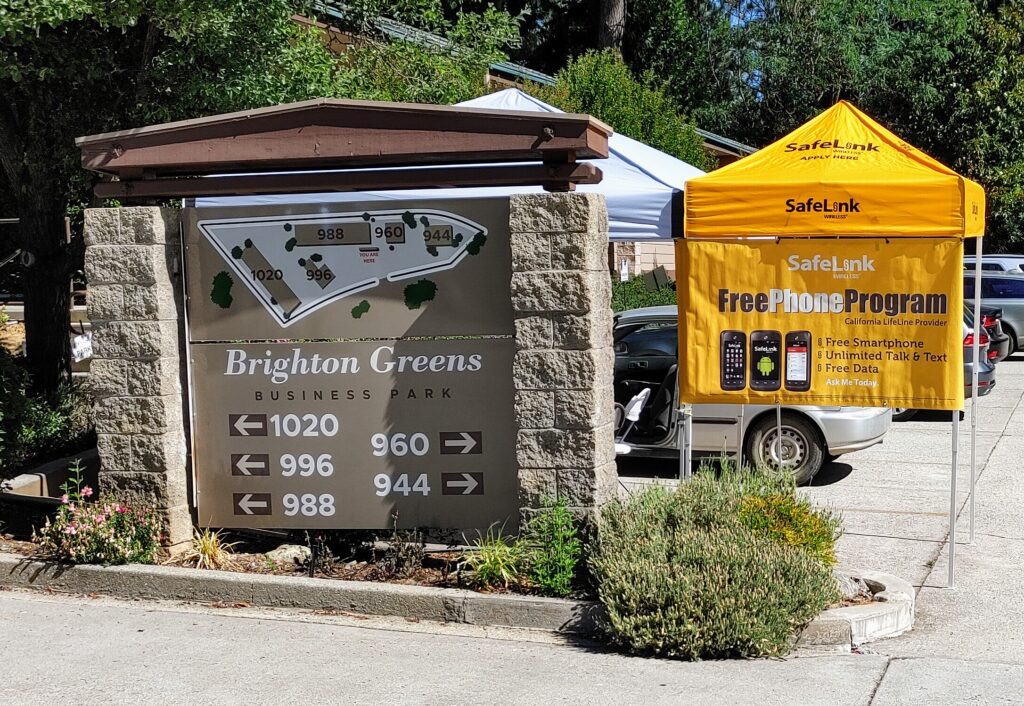
ATTENTION: I AM NO LONGER HELPING INDIVIDUALS SIGN UP FOR LIFELINE.
For questions call the Lifeline Administration here: https://www.cpuc.ca.gov/consumer-support/financial-assistance-savings-and-discounts/lifeline/california-lifeline-contacts
or, go to the lifeline website here: https://www.californialifeline.com/en
| Lifeline Provider | Cellular Network(s) | Website |
|---|---|---|
| Safelink Wireless | Verizon | https://www.safelinkwireless.com/ |
| StandUp Wireless | T-Mobile | https://www.standupwireless.com/ |
| TruConnect | T-Mobile | https://truconnect.com/ |
| Life Wireless | AT&T, T-Mobile | https://www.lifewireless.com/ |
| TAG Mobile | Verizon, T-Mobile | https://www.tagmobile.com/ |
| Access Wireless | T-Mobile | https://www.accesswireless.com/ |
| SafetyNet Wireless | T-Mobile | https://www.safetynetwireless.com/ |
| Feelsafe Wireless | AT&T | https://www.feelsafewireless.com/ |
| Assurance Wireless | T-Mobile | https://www.assurancewireless.com/ |
| American Assistance | ?Verizon, T-mobile? | https://americanassistance.com/ |
| Infiniti Mobile | ?AT&T,Verizon,T-mobile? | https://www.infinitimobile.com/ |
To create the above list, I cross referenced the California lifeline list here:
https://www.californialifeline.com/en/provider_search and here: https://cnm.universalservice.org/
with the Wikipedia article here:
https://en.wikipedia.org/wiki/List_of_United_States_mobile_virtual_network_operators
Safelink
NOTE: Since Verizon’s purchase of Movil the owner of Safelink, Net10, tracfone, pageplus. etc.. They only support the Verizon network.
I chose Safelink Wireless, because it is the only lifeline mobile virtual network operator who resells all 3 networks in California. You get unlimited talk, text, and data. As well as unlimited international calling to 69 countries. List of the 69 countries here: https://www.net10wireless.com/ilddestinations
Safelink also supports advanced features, such as: WiFi calling, WiFi texting (RCS), Hotspot, call forwarding, etc..
What you get!
The SIM card
You will get a T-mobile, Verizon, or AT&T SIM card depending on stock. You can tell by the first 5 numbers of the ICCD # on your phone box:
- 89148 Verizon
- 89012 TMobile
- 89014 ATT
The phone
NOTE: This information is outdated! You get a better phone now.
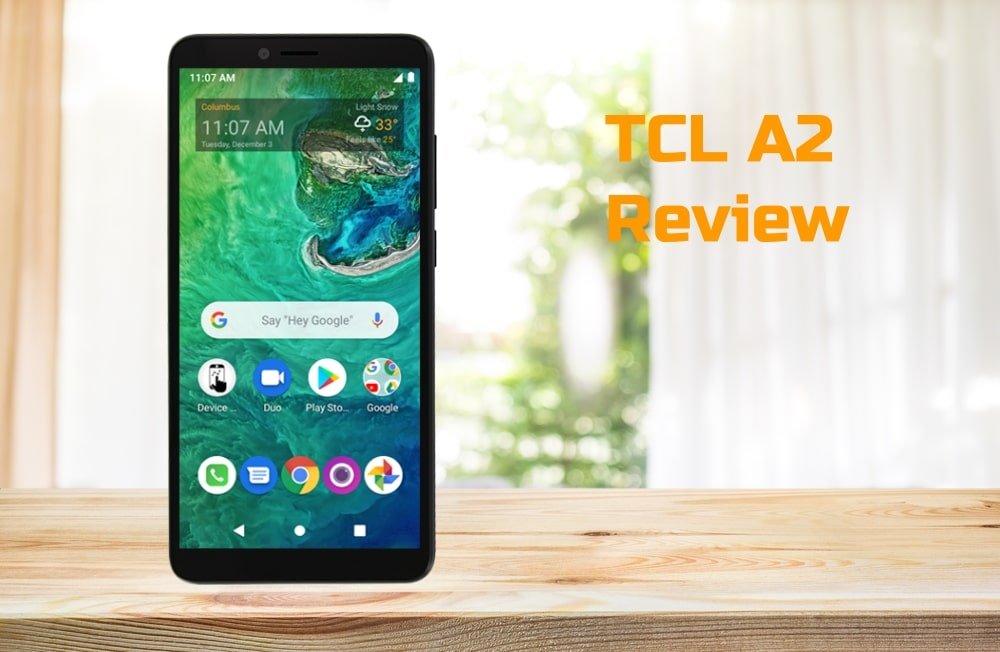
The free smartphone is the Alcatel TCL A2:
- OS: Android 10
- Screen size: 5.5-inch
- Resolution: 960 x 480
- CPU: 1.8GHz Quad-core processor
- RAM: 3GB
- Storage: 32GB
- Battery: 3000mAh, non-removable
- Rear camera: 8MP
- Front camera: 5MP
Full review here: https://tracfoneusermanual.net/tcl-a2-review/
Eligibility
You need proof of address, AND proof of eligibility. Here are some things you can use:
You need one of these :
- EBT card (Calfresh)
- Medi-cal card (The original one)
- TANF
- Calworks
- National school lunch program
- WIC
- Liheap
- SSI Awards letter
- Passport to Services ( A letter that the county can print out for you that states you’re receiving Medi-cal or Calfresh)
- Or, your 2020 tax return. Cannot be hand written. You must make less than 28,000 per year.
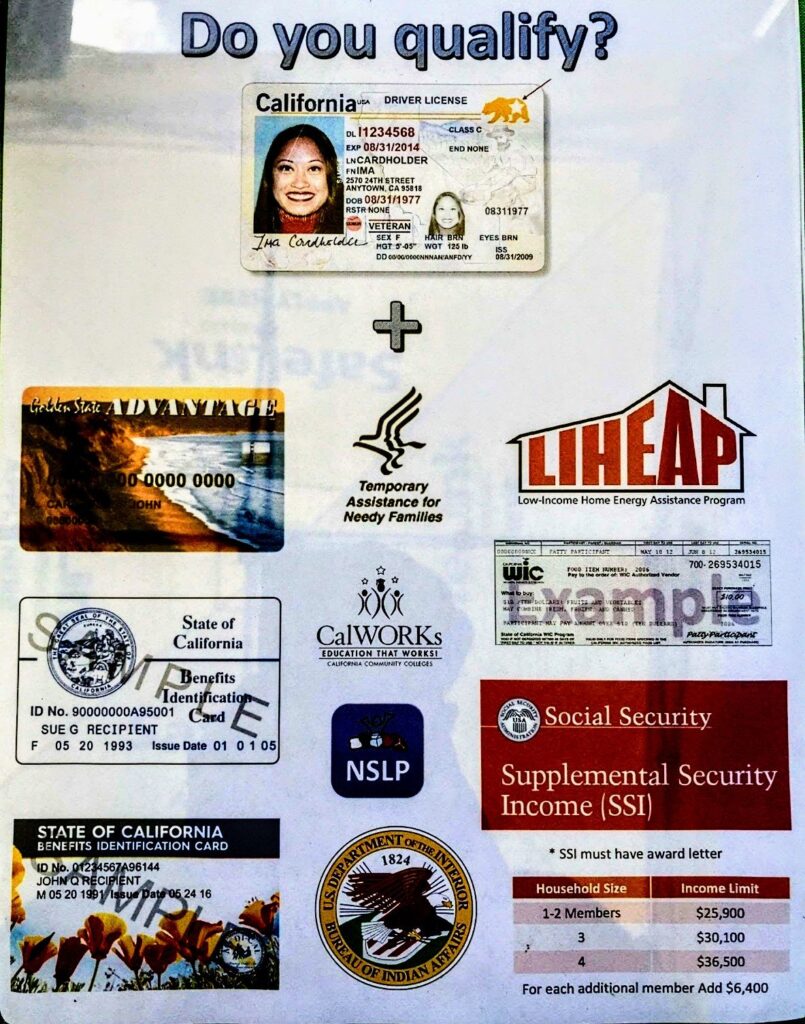
If your name, DOB, or social security number is not in their database then you’ll need a signed social security card, and a birth certificate, or ID.
Proof of Address
AND, you need one of these:
- Recent utility bill with name and address
- Current income statement from an employer,
- paycheck stub, or w-2 with name and address
- Prior year’s state, federal, or tribal tax return with name and address
- Current mortgage or lease agreement with name and address
- Unexpired California drivers licence
- Unexpired government, state, or tribal issued ID
- Government assistance program documents with name, address and effective dates
- Statement of benefits from a qualifying program with name, address and effective dates
- Retirement/pension statement of benefits with name and address
- Unemployment/workers’ compensation statement of benefits with name address and effective dates . Cal-Fresh and Medi-Cal verification of benefits form with name, address and effective dates
- Verification of receipt of Cal-fresh with name address, and date
- We can also use a “Verification of services letter” from a nonprofit. Make sure it has your name that matches your eligibility card. They will write in the letter that you are a client of theirs and receives assistance from their program. Make sure the name is printed, and the address is prominently displayed on organization letterhead.

If the address is not a valid residential address, you will need one of the below proofs:
- Recent Utility bill with the consumer’s name and address (not older than 90 days)
- Current income statement from an employer, paycheck stub, or W-2 with the consumer’s name and address
- Prior year’s state, federal, or Tribal tax return with the consumer’s name and address
- Current mortgage or lease statement with the consumer’s name and address
- Unexpired driver’s license
- Unexpired government, state, or Tribal issued ID
- Government assistance program documents with the consumer’s name, address, and effective date
- Statement of benefits from a qualifying program with the consumer’s name, address, and effective date
- Retirement/pension statement of benefits with the consumer’s name and address
- Unemployment/workers’ compensation statement of benefits with the consumer’s name, address, and effective date
Once you have your phone
Swipe right to access your home screen
Your new number will be in your text messages from 611611.
Make a call or text once a month to keep the service active.
Charge with included charger.
Look out for the pink letter welcoming your to the program.
Your recertification letter will come in 11.5 weeks.
It will take 5 days for ebb, your unlimited data and international calling to kick in.
Call 611 for customer service
Text ild to 611611 for the info. ItTo make International calls, dial 1-800-584-7652. or, You can download the International Dialer App here: iPhone: http://n10w.co/N9XmBm3 Android: http://n10w.co/NlVGgWq
Cancel it right away if you lose it. 1-800-safelin. Or call them to buy a new phone or sim card. I can give you a new phone 90 days after you cancel your service. Or, you can switch companies to get a new phone right away.
SafeLink uses NET10 sim cards. If you need a new one.
You can almost always port your old number in. It’s a federal law. More info here: https://www.fcc.gov/consumers/guides/porting-keeping-your-phone-number-when-you-change-providers Call 1800-safelin from a different phone.
Text 611611 one of the keywords found here: https://dsweb.safelink.com/611611/help/
SPEED To check if your data speed has been reduced, text the word SPEED to 611611
MINC To change your phone number, text the word MINC to 611611 or click here.
USAGE To see your current usage, text the word USAGE to 611611 or click here.
CHAT To get help through chat, text the word CHAT to 611611 or click here.
SUPPORT If you are experiencing issues with your service, text SUPPORT to 611611 or click here.
APP To download My SafeLink App, text the word APP to 611611 or Download your My Account app here: http://sflnk.co/L71Q4XZ
Free phones Nevada City, Grass Valley, Cedar Ridge, North San Juan, Penn Valley, Chicago Park, Camptonville, etc…
]]>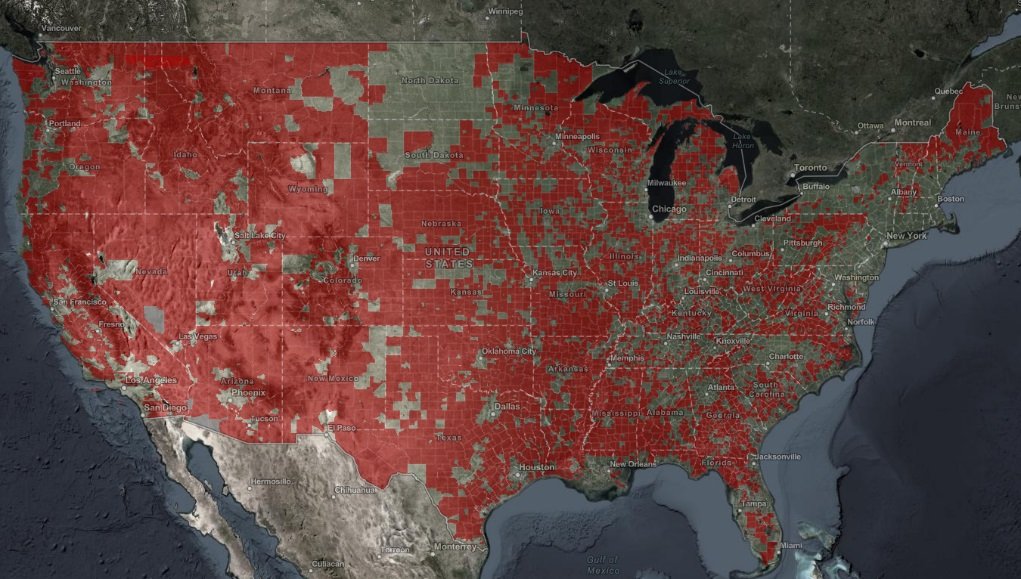
https://www.ntia.gov/press-release/2021/ntia-creates-first-interactive-map-help-public-see-digital-divide-across-country
]]>Broadband: 25Mbps down, 3Mbps up, and less than 100ms latency.
Neither fiber nor cable is available where I live. All the fixed wireless providers in Nevada County don’t serve my property. AT&T will provide me a DSL line running at the insanely slow speed of 768kbps. That’s around 90 Kilobytes per second download, and don’t get me started on upload. Although, better than a 56K modem, it’s not fast enough for my needs. Geosynchronous satellite’s latency is too high for real time interaction. Low earth satellite is not available yet. AT&T is the only cellular provider with adequate coverage, however only on the new LTE band 14, all the other bands are spotty. FirstNet LTE Band 14 has been installed all over the Country by AT&T funded by a giant grant from the Federal government. My options are really quite limited. Luckily, I did eventually find something that works. Check out all the internet options in Nevada County here:
https://jphein.com/internet-options-in-nevada-county/
Here is a list of phones that have this LTE band 14:
https://www.firstnet.com/devices/phones.html
A complete list of devices is here:
https://www.firstnet.com/content/dam/firstnet/white-papers/firstnet-certified-devices.pdf
AT&T does not offer an inexpensive unlimited plan (<$100/month). Thus began my search for someone that did. I started out searching the Wiki article of all the MVNOs. (Mobile Virtual Network Operators) All the folks that resell time on the 4 major USA networks. I sorted it by the network column so I could filter all the AT&T MVNOs: https://en.wikipedia.org/wiki/List_of_United_States_mobile_virtual_network_operators
Then I found the article below,
https://www.rvmobileinternet.com/gear/att-unlimited-rental-plans/
which pointed me to:https://www.cgcellular.com/ Which provides unlimited data on AT&T for $60. Definitely the least expensive I’ve found. *No longer offering this. Instead check out how to get unlimted data for free here: jphein.com/lifeline
All AT&T Wireless unlimited plans supposedly deprioritize your data if your local cell tower is congested after 22GB. I don’t think it happens much in rural areas.
I purchase the Netgear Nighthawk M1 (MR1100) directly from my local AT&T store. Although, now you can buy one used on eBay.
Be sure to get the MR1100-2A1NAS model. The first consumer model does not support band 14. Read about it here: https://community.netgear.com/t5/Mobile-Routers-Hotspots-Modems/Pre-April-Nighthawk-and-band-14-and-46/m-p/1555303#M5746
It supports all LTE bands that AT&T uses. It was ~$270 with tax purchased outright. I put it on the $10/month for 100MB BYOD business plan. They waived any activation fee. I was able to unlock it after 60 days, and discontinued the original $10 plan.
https://www.att.com/deviceunlock/unlockstep1
Although, not necessary to unlock it for any AT&T reseller. I unlocked it in case in the future I need to use it with T-mobile, or Verizon.
Although currently locked to AT&T, I can use it with any AT&T MVNO by changing the APN setting from the web gui.
http://attwifimanager/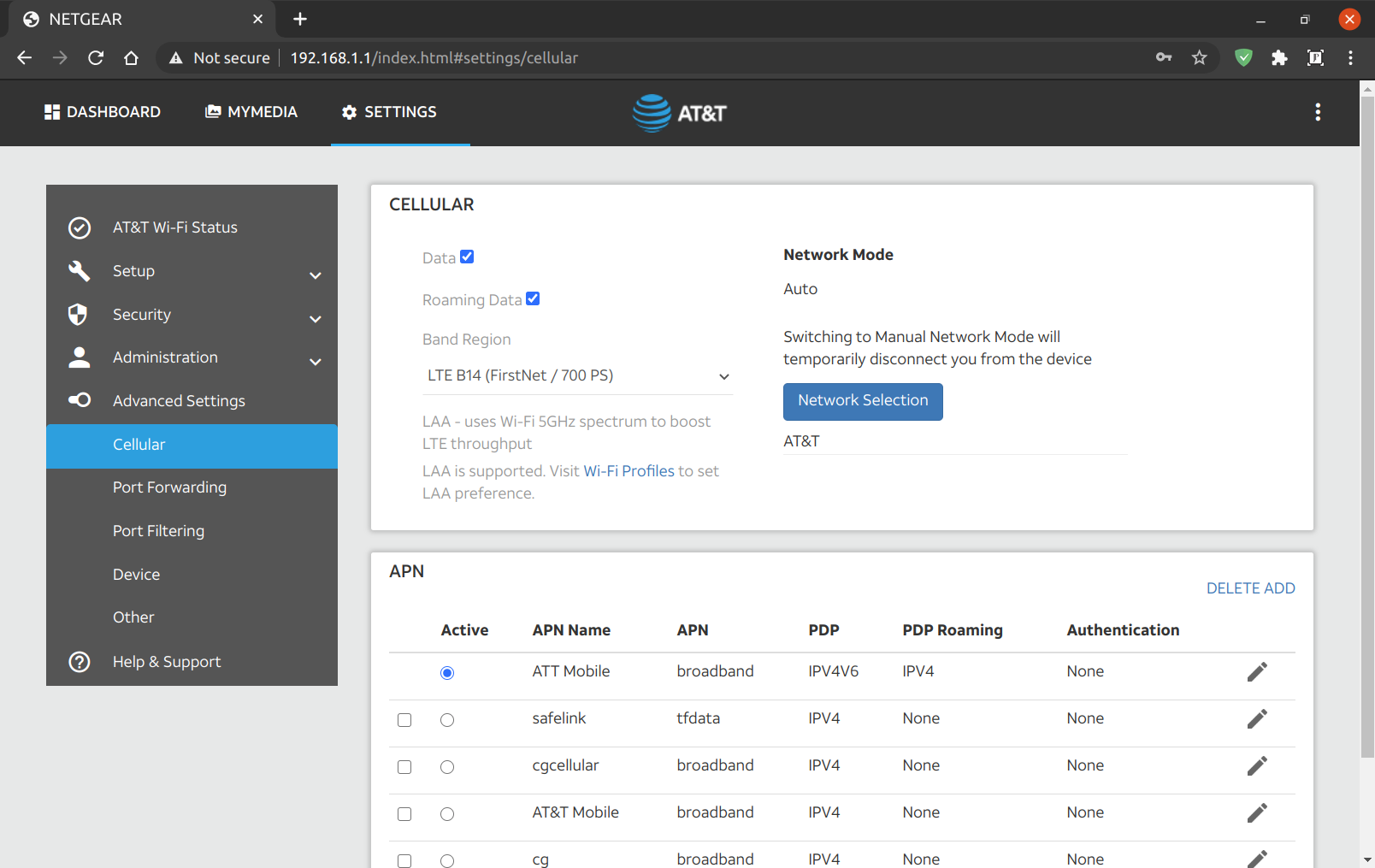
By plugging in the USB to my computer, and telnetting into the M1. I played around with the different LTE bands around my home, and various combinations using carrier aggregation.
#Open a terminal
telnet 192.168.1.1 5510
Edited the band selection dropdown:
AT!gstatus?
AT!band=?
AT!BAND=03,"LTE B2 (1900 MHz PCS)",           0,  2
AT!BAND=04,"LTE B4 (1700/2100 MHz AWS)",      0,  8
AT!BAND=05,"LTE B12 (700 MHz Lower B/C/A)",   0,  800
AT!BAND=06,"LTE B14 (FirstNet / 700 PS)",     0,  2000
AT!BAND=07,"LTE B30 (2300 MHz WCS)",          0,  20000000
AT!BAND=08,"LTE B66 (AWS-3)",                 0,  0,          2
AT!BAND=09,"LTE CA (B2+B4+B12+B14+B30)",      0,  2000280a
You need to reboot the router before the changes show up in the web gui.
I connected to each band individually, and ran a speed test. I then ran a speed test with all bands aggregated. Carrier aggregation with Band 14 doesn’t seem to work. Also, the builtin All LTE option doesn’t seem to choose Band 14. However, when I choose it manually, I get a great connection. Simply locking the device to use Band 14 gave me the best speeds.
LTE Band 14 with WiFi turned off sitting on my desk.

Much better than 0.768Mbps DSL, but not quite broadband.
I took it outside and set it facing the direction of the tower.

Sweet! Broadband Internet. I’ll make an enclosure for it, and run power and ethernet out to it.
I will order a pair of yagis. A type of directional antenna. For even faster speeds. FirstNet public safety LTE in the United States occupies two 10-MHz-wide blocks of spectrum at 758 MHz to 768 MHz (download), and at 788 MHz to 798 MHz (upload). So, I’ll be sure The antennas support those frequencies. The M1 has two external TS9 antenna ports.

Technical Specification
| Frequency Range | 698 – 894 MHz |
| Gain | 8dBi |
| Front to Back Ratio | bigger than 15dB |
| Impedance | 50 ohms |
| VSWR | Less than 1.5 |
| Cable Loss | 0.075 dB |
| Vertical Plane | 72°F ± 5°F |
| Horizontal Plane | 76°F ± 5°F |
| Polarization Type | Vertical or Horizontal |
| Connector Type | SMA Male |
| Number Of Element | 4 |
| Length without Cable | 37 cm |
| Weight | 0.7 Kg |
| Rated Wind Velocity | 150 Mile per Hour |
| Working temperature | -40°F ~ +140°F |
I had to order some SMA ends to shorten the antenna cable. You lose signal for every inch long your antenna cable is. I also ordered SMA to TS9 pigtails, and an outdoor enclosure.
I’ll set them up 90 degrees offset pointing at the same tower. I found my tower location using Opensignal app, then I used Google earth to find the heading. Which was for me 38 magnetic degrees from my house to the tower. I then used a compass app, or google maps to know where to point the antennas. I’m sure it will take some fine tuning. This is a great guide for doing line of sight with Google earth:
https://startyourownisp.com/posts/guide-to-google-earth/
{Speedtest}
There are three ways to use the M1 as a modem. You can connect via ethernet, USB, or WiFi. I found the best performance was wither USB or Ethernet with WiFi off.
#Check IMEI
ati#Restore corrupted IMEI
To unlock your NV:
https://github.com/bkerler/SierraWirelessGen
Installation
- Get python >=3.6 64-Bit~>
- git clone https://github.com/bkerler/edl/ ~>
- chmod +x edl/modem/sierrakeygen.py ~>
- cd edl/modem
- pip3 install -r requirements.txt
at!openlock?
./sierrakeygen.py -l <challenge> -d MDM9x40
AT!OPENLOCK="<generatedresponse>"
at!nvimeiunlock
#at!nvmeidunlock
at!nvencryptimei=xx,xx,xx,xx,xx,xx,xx,x0
#at!nvencryptmeid=xx,xx,xx,xx,xx,xx,xx
atihttps://www.pge.com/en_US/residential/rate-plans/rate-plan-options/tiered-base-plan/tiered-base-plan.page
Tiered rates
https://www.pge.com/tariffs/ResElecCurrent.xls
Time of use rates
https://www.pge.com/tariffs/ResTOUCurrent.xls
Electric Vehicle rates
https://www.pge.com/tariffs/tm2/pdf/ELEC_SCHEDS_EV.pdf
Energy/$ saving tips:
If low income, Enroll in the PGE low income CARE program
Use OHM Hour program to know when peak times are and get a rebate if you use less
Pay attention to bill amount, so you can see if your efforts are working
Lease or buy an Electrical Vehicle and sign up for special EV rates + $7000 state and $10,000 federal rebates + $500 clean fuel rebate PGE + $500 BOSCH charger
Install Solar or Get solar service
Sign up for county and/or PGE weatherization programs
Switch to LED bulbs
Put Manual power switches/bars on all wall warts, electronics, etc.. (power vampires) and keep off and/or timers on modems/wifi aps
Light sensitive motion sensor lights outdoors, attics, basements etc..
Use a composting toilet system, or displace some water in your toilet tank with a brick, etc..
Use a solar, wind or manual well pump
Use solar water heating
Plant a garden
Ride a bicycle
Use gravity for water pressure, you may need to change out your shower heads
Hang out outside and go to bed early
Hang clothes to dry, or add a dry towel to your machine dryer load
Summer
Cool off in the shade with no clothes
take a cold shower with clothes on
sit in the kiddie pool
Winter
Use wood heat
Hot tub/softub
Heat with cover on
Make sure jets are off
Keep water clean
add Timer
A very confusing topic! Don’t worry I figured it out. =] I will go over topics such as: Networks, Coverage, Technology, Resellers, Roaming, Lifeline (Free low income smart phone and monthly service), Prepaid, Cellphone hardware, Unlocking, Voice over IP (VOIP), Credo Mobile, Google Voice, Google Fi, Republic Wireless & Freedompop. All in the context of living in Nevada County.
Networks: There are four major networks in the USA: Verizon, ATT, T-mobile, and Sprint. I will refer to these 4 as networks.
Coverage: They all have different coverage in different areas. In order to be sure which is best for you, you can consult their maps. ask people you know, use aggregate crowd-sourced coverage map apps (Like OpenSignal or Sensorly), or test the different networks yourself.
Technologies: On top of the four networks they mainly use two wireless technologies 3g and 4g. (simplified; reality is much more complicated with different frequencies being used for most networks and technologies). Most networks have, or are in the process of shutting down their 2G networks. (AT&T shut its 2G GSM network down on December 31, 2016.[5] ). The coverage can be very different for these as well. Very old phones don’t use 4g, and some very new phones don’t use 3g. I will call these technologies.
Resellers: To further complicate the issue. There are hundreds of companies that resell service on these networks, usually for cheaper. These are called MVNOs or Mobile Virtual Network Operators. I will call these providers, resellers, carriers, or companies. What complicates it further is that resellers like Straight talk actually resell service on all four networks. They pick one for you based on either your location or the phone they want to sell you. More info here:
https://en.wikipedia.org/wiki/List_of_United_States_wireless_communications_service_providers
One really mystifying piece is that if you are one of the hundreds of resellers of these four major networks, a stipulation of your service agreement is that you cannot tell your customer which network/s you are reselling. They also don’t disclose their roaming partners. As a customer you have to figure that out yourself. One great resource is Wikipedia. A page I’ve contributing to quite a bit. =] Especially in the low income lifeline section for California. You can find the company you’re wondering about here:
https://en.wikipedia.org/wiki/List_of_United_States_mobile_virtual_network_operators
Roaming: In addition every company may have different roaming partners as well. This means that if your phone is compatible, and the networks are compatible you may hop networks when you don’t have your primary network available. Only If your carrier and that carrier are partners. Some have no roaming partners. Some charge you for roaming. Some don’t.
Lifeline: If you are low income, you can get a free smart phone and service on whichever network you prefer. Through the lifeline program that was started way back for landlines. Find a service to sign up for here:
https://en.wikipedia.org/wiki/List_of_United_States_mobile_virtual_network_operators#California
Nevada City: For instance where I live, ATT 4g works well. ATT 3g not well. Verizon 3G works ok. Verizon 4g not at all. Sprint 3g works intermittently. Sprint 4g not at all. T-mobile no go. So for me, a reseller of ATT 4g is best. In downtown Nevada City, all four networks seem to work, although T-mobile probably the worst. I haven’t tested in a while. Once you find out which network works best for you at home, traveling, and your day 2 day. I think it’s best to pick a reseller that matches your politics. Credo Mobile is committed to donating a large portion of their profit to charitable causes you get to vote on. They use the Verizon network now.
Prepaid: Prepaid phone just refers to whether of not your provider bills you in advance, or after the month of usage is over. Many companies offer both options. With a postpaid plan you run the risk of being charged exorbitant amounts of money if you go over your quota. With a prepaid plan, your service shuts off if you reach your quota, unless you buy more.
Cellphone hardware: Then there is the phone itself. not all phones work with all networks and technologies. It has to do with what the the radios installed and which electromagnetic frequencies the radios support. Some modern phones have all the radios in them. However, you have to swap a SIM card if you want to switch networks. Apple is working on a smart sim card, so you can use all the networks without swapping sim cards. To figure out which frequencies (technologies) your phone supports use a service like phonearena.com.
Unlocking: Some phones have been crippled or software “Locked” to a specific network even though the have the necessary hardware to work with others. Sometimes you can get the original company that sold the crippled phone to “Unlock” it.
VOIP: Most modern phones and cell phone carriers also offer voice and text over wifi. This can be called VOIP. This means that if you don’t have any coverage, or spotty coverage you can do your calling and texting over any available wifi network. The Google Fi project and Republic Wireless seamlessly swaps you from wifi, cellular and their roaming partners. Where as before your call would be disconnected as you switched networks. AT&T, Verizon, T-mobile, and Sprint are jumping on the bandwagon, but usually charge you extra for the service, and cannot seamlessly swap your call between cellular and wifi. Most modern voice communication is actually VOIP. Google Voice gives you a free virtual phone number with unlimited voice and texting. You can communicate from any internet connected device.
What do I use? I use a reseller of ATT 4G network, Freedompop for my cell phone service. They give me free service of up to 200MB/month per SIM card. They offer exactly zero customer support, and constantly try to trick you into upgrading to a paid service. It’s perfect for me. With google voice and freedompop I do all my communication over wifi or free cellular data. I have two landlines, my desktop, my laptops and a bunch of smartphones all hooked up to that number. I love typing my text messages. They are all connected to the internet. My landlines connect to a little box that is connected to the internet. My phone bill is $0. I pay $45/month for unlimited internet at home through Spiral internet. They are a local reseller of ATT DSL. I use Comcast cable internet at work.
Buy them here!
The laws in summary:
If you are over 18 you can use a device in handsfree mode. With a bluetooth headset, wired headset (only one ear covered), speakerphone, in-dash bluetooth, etc…
However, if you touch the device, it has to be “with the motion of a single swipe or tap of the driver’s finger.” in order to: “activate or deactivate a feature or function”
If under 18, you cannot use one at all. You can set up your route on GPS with your phone mounted on the dash, then start driving. Just don’t touch it, or wear a headset.
The ban on hands-free devices for drivers under 18 is a secondary violation. So, an officer cannot pull you over just for this infraction. An officer can, however, cite you for a violation if he or she pulls you over for another reason.
The cell phone laws only pertain to public roads.
http://www.nolo.com/legal-encyclopedia/cell-phones-driving-california-law-29709.html
VEHICLE CODE – VEH
DIVISION 11. RULES OF THE ROAD [21000 – 23336]
( Division 11 enacted by Stats. 1959, Ch. 3. )
CHAPTER 12. Public Offenses [23100 – 23249.50]
( Chapter 12 enacted by Stats. 1959, Ch. 3. )
ARTICLE 1. Driving Offenses [23100 – 23135]
( Heading of Article 1 added by Stats. 1981, Ch. 940, Sec. 9. )
23123.5.
(a) A person shall not drive a motor vehicle while holding and operating a handheld wireless telephone or an electronic wireless communications device unless the wireless telephone or electronic wireless communications device is specifically designed and configured to allow voice-operated and hands-free operation, and it is used in that manner while driving.
(b) This section shall not apply to manufacturer-installed systems that are embedded in the vehicle.
(c) A handheld wireless telephone or electronic wireless communications device may be operated in a manner requiring the use of the driver’s hand while the driver is operating the vehicle only if both of the following conditions are satisfied:
(1) The handheld wireless telephone or electronic wireless communications device is mounted on a vehicle’s windshield in the same manner a portable Global Positioning System (GPS) is mounted pursuant to paragraph (12) of subdivision (b) of Section 26708 or is mounted on or affixed to a vehicle’s dashboard or center console in a manner that does not hinder the driver’s view of the road.
(2) The driver’s hand is used to activate or deactivate a feature or function of the handheld wireless telephone or wireless communications device with the motion of a single swipe or tap of the driver’s finger.
(d) A violation of this section is an infraction punishable by a base fine of twenty dollars ($20) for a first offense and fifty dollars ($50) for each subsequent offense.
(e) This section does not apply to an emergency services professional using an electronic wireless communications device while operating an authorized emergency vehicle, as defined in Section 165, in the course and scope of his or her duties.
(f) For the purposes of this section, “electronic wireless communications device” includes, but is not limited to, a broadband personal communication device, a specialized mobile radio device, a handheld device or laptop computer with mobile data access, a pager, or a two-way messaging device.
(Repealed and added by Stats. 2016, Ch. 660, Sec. 2. Effective January 1, 2017.)
]]>