Nevada County
Local Resources
- The County of Nevada Nonprofit monthly office equipment giveaway. They computer equipment as well as office supplies and furniture. Last Friday of the month at the stoplight warehouse.
- Briar patch has several programs for nonprofits: https://briarpatch.coop/giving-back/
- Connect with United Way NC https://uwnc.org/become-a-uwnc-partner
- Local Volunteer Center
 : A resource for finding volunteer opportunities in your local community. People are looking for ways to give back to their community and make a positive impact, some may consider checking out their local volunteer center. These organizations provide a wealth of resources and opportunities for volunteers, including information on local volunteer opportunities, resources for volunteer management and coordination, and training and support for volunteers. To find your local volunteer center, simply search online for “local volunteer center” followed by the name of your city or region.
Regional Resources
- eScript for local donations at Grocery Stores www.escrip.com
- CVS grant for giftcards for nonprofits https://www.cvshealth.com/social-responsibility/our-giving
- Home depot project grants for nonprofits (gift cards) https://corporate.homedepot.com/page/home-depot-foundation
- Foundation Directory Online
 : Free access from your local library.
A database of foundations and grants, available for free through many libraries. Foundation Directory Online is a comprehensive database of foundations and grants, providing valuable information on funding opportunities for nonprofits. This resource is available for free through many libraries, providing organizations with a convenient and affordable way to research funding opportunities and plan their fundraising strategies. To learn more about Foundation Directory Online and how it can help your nonprofit, visit https://fdo.foundationcenter.org/. candid?
Online resources
This is not an exhaustive list, nor is it sorted in any particular order. Although, the ones at the top are more generally useful to the nonprofit. Many of them use techsoup.org to verify nonprofit eligibility.
Technology Help
- Online Impacts – a 501(c)(3) nonprofit organization that develops/hosts websites, provides digital marketing guidance, and creates technology solutions for impact-based nonprofits – https://onlineimpacts.org/ – Online Impacts is a great resource for nonprofits looking to maximize their impact. They offer comprehensive web development, marketing, and tech solutions to help organizations create meaningful change.
- NTEN – technology resources for nonprofits – https://www.nten.org/ – NTEN is a nonprofit that provides technology resources, best practices, and training for nonprofits to help them use technology more effectively. They also offer free webinars, conferences, and other events for nonprofits to learn and network.
- Idealware – tech training for nonprofits – http://idealware.org/ – Idealware provides tech training and resources specifically tailored for nonprofits, making it a great way for organizations to stay up to date on the latest tech tools.
- Nonprofit Tech for Good An informative blog with easy-to-understand information, news, and resources related to nonprofit technology, online communications, and social and mobile fundraising. https://www.nptechforgood.com/about-nonprofit-tech-for-good/
- Whole Whale
 : A nonprofit digital consultancy with resources and expertise available for free. Whole Whale is a nonprofit digital consultancy that provides a range of resources and expertise to organizations looking to maximize their impact through technology. From website design and development to data analysis and strategy, Whole Whale provides nonprofits with the tools and support they need to succeed in the digital age. And the best part? Their resources and expertise are available for free. To learn more about Whole Whale and how they can help your nonprofit, visit https://wholewhale.com/.
- Techsoup – discounted software – https://www.techsoup.org/ – Techsoup is a great resource for nonprofits looking to save money on technology. They offer discounted software licenses and hardware, as well as training and other resources to help nonprofits succeed.
Hardware
- Good360 – donated goods for nonprofits – https://good360.org/ – Good360 is an organization that provides nonprofits with donated goods such as school supplies, clothes, baby items, computers, etc. Their service is free for qualifying nonprofits, and a great way for organizations to get the items they need to succeed.
- ConnectAll – technology for nonprofits and people with low income – https://connectall.org/ – ConnectAll is a great resource for nonprofits and people with low incomes, offering discounted access to technology resources.
Cloud Services
- Google – https://www.google.com/nonprofits/
- Google Workspace for Nonprofits – free productivity suite -https://www.google.com/nonprofits/offerings/workspace/ – Google Workspace for Nonprofitsis a suite of tools designed to help nonprofits collaborate, communicate, and get work done more efficiently. It includes tools like Gmail, Drive, Calendar, Hangouts, and more.
- Google Ad Grants – free online advertising – https://www.google.com/grants/ – Google Ad Grants is a free online advertising program that helps nonprofits reach new audiences. It provides free ad credits that can be used to promote the organization’s website and message.
- Youtube Nonprofit Program – https://www.google.com/nonprofits/offerings/youtube-nonprofit-program/ – Engage your supporters using video with the YouTube Nonprofit Program. Unlock the power of video storytelling, so you can reach a global audience and amplify your cause. Plus, make it easy for supporters to give with YouTube Giving features (currently available in the U.S.).
- Google Earth Nonprofit – https://www.google.com/nonprofits/offerings/google-earth-and-maps/ – Google for Nonprofits provides Google Maps Platform credits to nonprofits. Show your nonprofit’s impact with Google Earth and Maps. Develop compelling data visualizations to track and share your organization’s impact. Plus, use Google Maps Platform to help people locate community programs and resources closest to them.
- Microsoft
- Office 365 for Nonprofits – productivity suite – https://www.microsoft.com/en-us/nonprofits – Microsoft Office 365 offer a variety of tools and resources to help nonprofits stay productive and efficient.
- Azure for Nonprofits – https://www.microsoft.com/en-us/nonprofits/offers-for-nonprofits – Leverage $3,500 (USD) Azure services credits per year and access the complete portfolio of Azure products and cloud services. Sign up for the Nonprofit Azure Onboarding Concierge and Success Center to set up your credits.
- Canva for Nonprofits – https://www.canva.com/canva-for-nonprofits/– Canva for Nonprofits is a free design tool that allows nonprofits to create beautiful visuals for websites, social media, and other marketing materials.
- Slack for Nonprofits – https://slack.com/nonprofit – Slack is a great way for teams to communicate and collaborate in real-time. Slack for Nonprofits provides additional features and discounts to help nonprofits stay connected.
- Asana for Nonprofits – https://asana.com/nonprofits – Asana is a great tool for project management and task organization. Asana for Nonprofits provides discounts and additional features to help nonprofits stay organized.
- Cloudflare – https://www.cloudflare.com/ – Cloudflare provides reliable and secure web services to nonprofits of all sizes, making it easier for them to reach their audiences and expand their reach online. With its free plan, nonprofits can use a range of services to boost their online presence, including enhanced security, faster page loading times, and improved performance
- Box.org – free cloud storage for nonprofits – https://www.box.com/industries/non-profit – Box.org provides free cloud storage for nonprofits. It’s a great way for nonprofits to securely store, share,and access data, documents, and other files.
- CivicChamps – managing volunteers – https://www.civicchamps.com/ – CivicChamps is a great way for nonprofits to recruit, manage, and track volunteers. It offers 50% off to help nonprofits save money.
- Dreamhost – web host provider – https://www.dreamhost.com/ – Dreamhost is a web host provider that offers free shared website and email hosting for nonprofits. It’s a great way for organizations to save money on web hosting costs.
- eBay – waives selling fees for Nonprofits – https://charity.ebay.com/for-nonprofits/ – eBay waives their selling fees for nonprofits, making it an easy and cost-effective way to raise money for causes.
- T-Mobile Network – unlimited Internet 4G WiFi Hotspot for nonprofits for $10/month with $18 for hotspot device – www.mobilebeacon.org/ – The T-Mobile Network offers unlimited 4G internet for nonprofits at a discounted price of $10/month and $18 for a hotspot device.
- PayPal Giving Fund – donations for nonprofits – https://www.paypal.com/us/webapps/mpp/donations – PayPal Giving Fund is a great way for nonprofits to receive donations from PayPal users. It’s a free service that makes donating easy and secure.
- Facebook Fundraisers – donations for nonprofits – https://www.facebook.com/fundraisers – Facebook Fundraisers are a great way for nonprofits to reach a larger audience and raise money for their cause. They provide an easy and secure way for users to donate to their favorite nonprofits.
- Salesforce Nonprofit Cloud – free CRM software – https://www.salesforce.org/nonprofit – Salesforce Nonprofit Cloud is a free Customer Relationship Management (CRM) software designed to help nonprofits build better relationships with their donors and supporters.
- GitHub Nonprofit Program – free developer tools – https://socialimpact.github.com/ – GitHub Nonprofit Program provides free developer tools and services to help nonprofits build software and manage projects.
- MailChimp
 : An email marketing platform with a free plan for nonprofits. Mailchimp offers a range of features including email design templates, automation, and analytics. Nonprofits can send up to 12,000 emails to 2,000 subscribers per month for free. Check it out at: https://mailchimp.com/
- Hubspot
 : A comprehensive marketing, sales, and customer service platform with a free nonprofit plan. Hubspot offers a range of features including website builder, email marketing, and a CRM. Nonprofits can access all the tools for free, with no time limits or restrictions. Learn more at: https://www.hubspot.com/
- Buffer
 : A social media management tool with a free plan for nonprofits. Buffer allows nonprofits to schedule, publish, and analyze posts on multiple social media platforms from one place. Nonprofits can access the basic plan for free, including support for three social media profiles. Get started at: https://buffer.com/
- Otter.ai
 : An AI-powered tool for transcribing and recording meetings, available for free to nonprofits. Otter.ai uses AI to transcribe and organize audio and video recordings in real-time. Nonprofits can access 600 minutes of transcription per month for free. Find out more at: https://otter.ai/
- Givelively : A fundraising platform that is free for nonprofits to use. Givelively offers a range of features including online fundraising pages, donation processing, and donor management. Nonprofits can use the platform for free, with no transaction fees or hidden costs. Get started at: https://www.givelively.org/
- Mobilize
 : A platform for organizing volunteer events and campaigns, available for free to nonprofits. Mobilize makes it easy for nonprofits to recruit, manage, and mobilize volunteers. Nonprofits can use the platform for free, with no limits on the number of volunteers or events. Sign up at: https://mobilize.us/
- LinkedIn : A professional networking platform with a free nonprofit account. LinkedIn is a platform designed for professional networking, connecting millions of professionals from around the world. Nonprofits can take advantage of LinkedIn’s free nonprofit account, which provides access to a wealth of resources and tools to help organizations build their online presence and connect with potential supporters, partners, and collaborators. To learn more about the free nonprofit account offered by LinkedIn, visit https://business.linkedin.com/non-profits.
- ClickUp
 : A project management tool with a free plan for nonprofits.ClickUp is a comprehensive project management tool that can help organizations of all sizes streamline their workflows and collaborate more effectively. The tool is available for free to nonprofits, offering a range of features and tools to help organizations stay organized and on track, including task management, project tracking, and team collaboration. To learn more about ClickUp and how it can help your nonprofit, visit https://clickup.com/.
- Webflow
 : A website design and development platform that offers a free plan for nonprofits. With Webflow, nonprofits can create beautiful, functional websites without having to write code. Nonprofits can take advantage of Webflow’s intuitive design tools, extensive design library, and customizable templates to create a website that meets their unique needs. To get started with Webflow, visit https://webflow.com/
- Codesandbox
 : A code editor and development environment that is available for free to nonprofits. Codesandbox provides a collaborative environment for developers to create and test their code, making it easier for nonprofits to build and maintain their websites and applications. To access Codesandbox, go to https://codesandbox.io/
- Twilio.org – https://twilio.org
Twilio offers free and discounted access for nonprofits to it’s powerful SMS and messaging platform. They are a proud member of the Pledge 1% for companies, redirecting 1% of their profit to social impact. They also run an annual impact fund for funding direct ideas in the community using SMS. More about this on our podcast with Twilio.org. - Okta Cloud-based identity management platform for nonprofits. Okta offers a discount to eligible nonprofits, providing up to 50 free licenses for their identity management.platform.https://www.okta.com/nonprofits/
- Loom
 : A screen and camera recording tool with a free plan for nonprofits. Loom is a screen and camera recording tool that makes it easy to capture and share video content with others. The tool is available for free to nonprofits, providing organizations with a convenient and affordable way to create and share videos for a variety of purposes, including fundraising, marketing, and community engagement. To learn more about Loom and how it can help your nonprofit, visit https://www.loom.com/.
- GrantAdviser – a safe way to anonymously give and receive feedback on grantmaking – https://grantadvisor.org/ – GrantAdviser is a platform that allows nonprofits to review and rate their grantmaking experiences. It provides a safe and anonymous environment to share experiences and feedback that can help other organizations.
- Charity Navigator is a nonprofit that rates charities in the US based on financial health, accountability, and transparency. Their rating system uses one to four stars. They also offer resources for donors and a paid service for personalized giving recommendations. Visit their website at: https://www.charitynavigator.org/
You don’t pay taxes on communication services if you are certain type of nonprofit.
Other ideas
ewaste drives
Further reading
https://www.idealist.org/en/fundraising-resources/free-or-low-cost-services
]]>
National Broadband Map
The new Broadband Map website maintained by the Federal Communications Commission (FCC) is an online tool that allows users to search and compare broadband internet availability and speeds at their specific address. The website provides a wealth of information related to broadband connectivity, including information on broadband providers, types of service available, and connection speeds. Be sure to dispute any carrier that is on this map, but can’t provide you service. Be sure to check that out: https://broadbandmap.fcc.gov/home
NEWSFLASH
https://www.nevadacountyca.gov/CivicAlerts.aspx?AID=6430
 Great news for residents of Nevada County, California! The county is set to streamline compliance with the California Environmental Quality Act (CEQA) to remove barriers and accelerate broadband development, with the final environmental impact report set to be presented before the Board of Supervisors on 28 February. The countywide report, available from 10 February, aims to speed up the granting of federal and state funds to individual fibre projects. The county said construction of the latter could start as early as spring 2023.
 For those interested in accessing the programmatic FEIR, it can be found on the Nevada County Community Development Agency’s website at https://www.nevadacountyca.gov/513/Projects-Supporting-Documents. The PDF report can be directly accessed at https://www.nevadacountyca.gov/DocumentCenter/View/47183/Broadband-Program-Final-Environmental-Impact-Report.
 To stay informed on the latest broadband news, residents can sign up for the Broadband in Nevada County Newsletter at https://www.mynevadacounty.com/broadband. For any questions, concerns, or opportunities to bring service to undeserved areas, connect with the county via email at [email protected].

FREE INTERNET for people with low income
The FCC launched a new program called the Affordable Connectivity Program (ACP) on December 31, 2021. The ACP is a new $14.2 billion program that is part of the Consolidated Appropriations Act of 2021. It is designed to provide low-income households with affordable broadband internet service and connected devices, such as laptops or tablets.
The ACP replaces the Emergency Broadband Benefit program that was launched earlier in 2021. It expands the scope of the Emergency Broadband Benefit program by providing a more comprehensive set of benefits to eligible households. Specifically, the ACP provides eligible households with a $30 monthly discount on broadband service and up to $100 off a connected device, such as a laptop or tablet. The program also covers the cost of installation and provides ongoing technical support to help ensure that households are able to take advantage of the benefits provided by the program.
Eligibility for the ACP is based on income and participation in certain assistance programs, such as Medicaid or the Supplemental Nutrition Assistance Program (SNAP). Eligible households can enroll in the program through participating broadband providers or directly through the ACP website.
The goal of the ACP is to provide affordable and reliable broadband internet access to low-income households, thereby helping to bridge the digital divide and promote greater economic opportunity and social equity. The program is expected to provide critical support to millions of households across the United States and help to ensure that they have access to the tools and resources needed to participate fully in the digital economy.
ACP eligible providers that provide a $0 with ACP plan:
TREELINK Fixed Wireless – Looking for affordable internet? Check out Treelink’s distributed mesh fixed wireless!  They offer a $0 plan with ACP eligibility. Sign up at http://treelink.us/ to enjoy internet connectivity. Treelink uses Althea blockchain technology to make internet available to residents near Nevada City. The service area uses ADI (AT&T Dedicated Internet), and Comcast as exit nodes.


AT&T DSL – Get connected to the internet with DSL ATT! With ACP eligibility, you can get their $0 plan and enjoy reliable internet connectivity. Check out their offerings at https://www.att.com/help/affordable-connectivity-program/.
PCSFORPEOPLE LTE Cellular – Get affordable internet and technology options from @pcsforpeople!  They offer mobile hotspot-based internet service using the T-Mobile network, with unlimited 4G LTE and up to 23GB/month of high-speed prioritized data. After 23GB, heavy data users may experience slower speeds due to data deprioritization. Plus, you can snag a laptop for just $10 www.pcsforpeople.org.
Other low income Internet programs:
- Comcast – http://www.internetessentials.com/ $10/month
- ATT- https://accessatt.solixcs.com/#/home $5-$10/month
- Suddenlink – https://www.alticeadvantageinternet.com/ $15/month
- Cellular Human-I-T https://hitconnect.org/sales/buyInternet?product=6616 $15/month
Complete List of Available Internet Options
List is sorted by relative speed, and type.
Fiber Internet (synchronous)
Pros:
- Very fast and reliable speeds, both upstream and downstream
- Good for heavy internet usage, such as streaming and online gaming
- Future-proof technology that can handle increasing demands
Cons:
- Can be expensive, especially for higher speeds
- Limited availability in some areas due to infrastructure requirements
- Vulnerable to damage from construction and natural disasters
| Provider | Service Area | Notes | Signup Link |
|---|---|---|---|
| AT&T ABF | Metro | Shared: Best option if available. | N/A |
| AT&T ADI/MIS | Most places | Dedicated: Very expensive. | N/A |
| Vast Networks | Coverage map | Middle-mile project funded by ARRA, can be better price than ADI. Not sure about last mile. | https://vastnetworks.com/ |
| Race Communications | Hwy 174 to Airport in Grass Valley | Goes down often, well priced. Speeds are much slower than advertised. | https://www.race.com/ |
| Newtown Fiber | Newtown Rd. | N/A | |
| Nevada County Fiber | Banner Mountain | Accepts ACP. | https://www.nevcofiber.com/ |
| Northern Sierra BBP | Buck Mountain Road, Oak Drive, Arianna Court, Sunset View Court, and Mountain Park | The Northern Sierra Broadband Project (Not built yet) | N/A |
| Spiral Fiber | North of Nevada City limits | (Not built yet) | https://www.spiral.com/ |
| Plumas Sierra | Truckee | https://www.plumassierratelecom.com/ |
Cable Internet
Pros:
- Faster speeds than DSL
- Generally more widely available than fiber
- Often bundled with TV and phone services
Cons:
- Speeds can be affected by network traffic
- Connection speeds can vary depending on location
- Not as reliable or fast as fiber
| Provider | Service Area | Notes | Signup Link |
|---|---|---|---|
| Comcast (Xfinity) | Grass Valley, Nevada City, Penn Valley areas | https://www.xfinity.com/ | |
| Comcast Business | Same as above | https://business.comcast.com/ | |
| SuddenLink | Alta Sierra, parts of south county, Truckee areas | https://www.suddenlink.com/ |
Fixed Wireless
Pros:
- Can be a good option for rural areas where other types of internet are not available
- Can be more affordable than other types of internet
- Can be installed quickly
Cons:
- Can be affected by weather, terrain, and other factors
- Can have slower speeds and less reliability than fiber or cable
- Limited availability in some areas
| Provider | Service Area | Notes | Signup Link |
|---|---|---|---|
| Treelink | Outside of Nevada City | Althea Distributed mesh. Uses ADI (AT&T Dedicated Internet) and Comcast as exit nodes. | https://treelink.us/ |
| Digital Path | Western Nevada County up to 5-Mile House | No data limits. | https://digitalpath.net/ |
| Smarter Broadband | Some parts of Western Nevada County | https://www.smarterbroadband.net/ | |
| Succeend.net | Lake Wildwood? | https://www.succeed.net/ | |
| Exwire | Truckee? | https://www.exwire.com/ | |
| Colfax.net | Colfax & parts of Hwy 174 area to Grass Valley | https://www.colfax.net/ | |
| GoSkyWest | Lime Kiln, McCourntney, Wolf Rd., and more | https://goskywest.com/ |
Low Earth Orbit Satellite Internet
Pros:
- Can be a good option for rural areas where other types of internet are not available
- Fast speeds and low latency
- Can be used anywhere with a clear view of the sky
Cons:
- Can be affected by weather and other factors
- Can be expensive, especially for heavy internet usage
- Limited availability and long waitlists in some areas
| Provider | Service Area | Notes | Signup Link |
|---|---|---|---|
| Starlink | Current round is sold out in our area. RV edition also sold out in our area. | https://www.starlink.com/ |
5G Cellular Internet
Pros:
- Fast speeds and low latency
- Can be used anywhere with 5G coverage
- Can be bundled with other cellular services
Cons:
- Limited coverage in some areas
- Can be affected by network congestion and other factors
- Can be expensive for heavy internet usage
| Provider | Service Area | Notes | Signup Link |
|---|---|---|---|
| AT&T | Not available yet in our area | N/A | |
| T-Mobile | Not available yet in our area | N/A | |
| Verizon | Not available yet in our area | N/A |
4G & LTE Cellular Internet
Pros:
- Can be used anywhere with cellular coverage
- Can be bundled with other cellular services
- Portable and easy to use
Cons:
- Can be expensive for heavy internet usage
- Slower speeds and higher latency than other types of internet
- Limited coverage in some areas
| Provider | Service Area | Notes | Signup Link |
|---|---|---|---|
| Verizon | Hotspot | https://www.verizon.com/ | |
| AT&T | Hotspot | https://www.att.com/ | |
| T-Mobile | Hotspot | https://www.t-mobile.com/ |
DSL (aDSL) or U-verse
Pros:
- Can be more affordable than other types of internet
- More widely available than fiber
- Can be bundled with phone services
Cons:
- Speeds can be affected by distance from the provider
- Not as reliable or fast as fiber
- Limited availability in some areas
| Provider | Service Area | Notes | Signup Link |
|---|---|---|---|
| AT&T Internet | Grass Valley, Nevada City, Penn Valley, Truckee | Digital Pair Gain from a fiber connected terminal. ACP eligible. | N/A |
Geosynchronous Orbit Satellite Internet
Pros:
- Can be used anywhere with a clear view of the sky
- More widely available than Low Earth Orbit satellite internet
- Can be bundled with other satellite services
Cons:
- Higher latency and slower speeds than other types of internet
- Can be affected by weather and other factors
- Limited availability in some areas
| Provider | Service Area | Notes | Signup Link |
|---|---|---|---|
| Viasat | Also known as Exede or Wildblue. Viasat-2 satellite launched in 2017. Viasat-3 satellites in development. | https://www.viasat.com/internet | |
| HughesNet | https://www.hughesnet.com/ | ||
| Skycasters | VSAT services for enterprise and government customers. | https://www.skycasters.com/ |
Legacy Providers
- [wiki]Fiber Internet[/wiki] (synchronous)
- AT&T ABF (AT&T Business Fiber) Shared : The BEST option if available.
SERVICE AREA: Metro - AT&T ADI (AT&T Dedicated Internet) aka MIS (Managed Internet Service) ATT Dedicated Business Fiber (Available many places, but very expensive) ~$500/month for 10Mbps ~$2300/month for 1Gbps symmetrical up to 10Gbps
SERVICE AREA: Most places - Vast Networks http://vastnetworks.com Coverage map
A middle-mile project that had been funded by the American Recovery and Reinvestment Act (ARRA)
NOTES: Can be a better price than ADI, like $1000/month for 1Gbps symetrical.
Not sure about last mile. - Race Communications race.com (Zone 1 has been completed)
SERVICE AREA: On Hwy 174 to Airport in Grass Valley
NOTES: Goes DOWN many times a week! Speeds are much slower than advertised. Is well priced at ~$100/month for 1Gbps symmetrical. - Newtown Fiber? (VAST)
SERVICE AREA: Newtown rd.
- Nevada County Fiber (ATT) ACCEPTS ACP!
SERVICE AREA: Banner Mountain
https://www.nevcofiber.com/ - The Northern Sierra Broadband Project (Not built yet) (ATT)
SERVICE AREA: Buck Mountain Road, Oak Drive, Arianna Court, Mountain View Court, Sunset View Court, and Mountain Park Court, in unincorporated Grass Valley - Spiral Fiber (Not built yet) (Vast)
https://www.spiral.com/
SERVICE AREA: north of the Nevada City limits in the Lake Vera Purdon Road and North Bloomfield Road neighborhoods - plumassierratelecommunications.com
SERVICE AREA: Truckee
- AT&T ABF (AT&T Business Fiber) Shared : The BEST option if available.
- [wiki]Cable Internet[/wiki]
- Comcast (Xfinity)
SERVICE AREA: Grass Valley, Nevada City, Penn Valley areas - Comcast business
SERVICE AREA: same as above - SuddenLink
SERVICE AREA: Alta Sierra, parts of south county, Truckee areas
- Comcast (Xfinity)
- [wiki]Fixed Wireless[/wiki]
- Treelink – distributed mesh
Signup here: http://treelink.us/
Althea blockchain technology http://althea.net/ SERVICE AREA: Outside of Nevada City NOTES: Uses ADI (AT&T Dedicated Internet), and Comcast as exit nodes.
- Digital Path
SERVICE AREA: Western Nevada County up to 5-Mile House - Smarter Broadband
SERVICE AREA: Some parts of Western Nevada County - Succeend.net
SERVICE AREA: (Lake Wildwood?) - exwire.com
SERVICE AREA: (Truckee?) - colfax.net
SERVICE AREA: Colfax & parts of Hwy 174 area to Grass Valley - goskywest.com
SERVICE AREA: Lime Kiln, McCourntney, Wolf Rd., and in south Alta Sierra, Golden Oaks, the Cottage Hill area off Running M, Lake of the Pines and the Ranchos.
- Treelink – distributed mesh
- 5G [wiki]Cellular Internet[/wiki] (Not available yet in our area)
- AT&T
- T-Mobile
- Verizon
- [wiki]Low Earth Orbit[/wiki] [wiki] Satellite Internet[/wiki]
- Starlink Current round is sold out in our area. RV edition also is sold out in our area. Waitlist is until 2023.
- 4G & LTE [wiki]Cellular Internet[/wiki] Hotspot
- Verizon
- AT&T
- T-mobile
- Oasisbroadband? (Resells ATT and T-mobile)
- or third party resellers of the above networks… Check out all your options here:
https://en.wikipedia.org/wiki/List_of_United_States_mobile_virtual_network_operators
- [wiki]DSL[/wiki] (aDSL) or [wiki]U-verse[/wiki] (aDSL2+ or vDSL)
- AT&T Internet – U-verse (aDSL2+) Digital Pair Gain from a fiber connected terminal. ACP eligible.
Third party ATT resellersOmsoft in Davis (Subcontracts to SonicNet)
SERVICE AREA: Grass Valley, Nevada City, Penn Valley, and Truckee areas
No data limits
AT&T DSL Legacy (Shutting down June 30th 2022)Copper from the main office (No longer available from ATT in many places)
- [wiki]Geosynchronous Orbit[/wiki] [wiki]Satellite Internet[/wiki]
(!low on list because of High Latency realtime interaction is delayed)- Viasat (aka Exede aka Wildblue)
- Hughsnet
- VSAT – https://www.skycasters.com/
3G[wiki] Cellular Internet[/wiki] Hotspot (Average 600Kbps – 1.4 Mbps and up to 3.1 Mbps)
ATTENTION: All carriers are disabling 3G by 2022.Verizon,
AT&T,T-mobile,or third party resellers…
[wiki]ISDN[/wiki] – Integrated Services Digital Network
Not sure this still exists…[wiki]56K Modem[/wiki] over AT&T phone lineother third partyATT
Coverage Maps
As you can see, https://www.nevadacountyca.gov/1460/Local-Broadband-Providers-Coverage-Maps, needs some updating.
California coverage map: https://www.broadbandmap.ca.gov/
Federal coverage map: https://broadbandmap.fcc.gov/.
(Hopefully, this should be more accurate by the end of Summer 2020: https://www.benton.org/blog/congress-tells-fcc-fix-broadband-maps-now)
Background
Many in Nevada County live outside the city centers. Combined with the varied terrain, and heavy forests. This makes finding a reliable and fast internet connection sometimes exceedingly difficult.
Broadband internet is currently defined by the FCC as 20Mbps down and 3Mbps up with latency of less than 100ms. More recently it has been mentioned by California as 25Mbps down and 25Mbps up with latency suitable for real time interaction.
Only Fiber and Cable offer upload speeds that high. Fixed wireless, and occasionally 4G LTE Cellular can offer adequate download speeds. If possible, Fiber and Cable are the top choices for speed and reliability. There are many areas in Nevada County that do not have any internet options or can only access internet over unreliable high latency satellite, cellular or wireless connections. This is a huge issue. Part of the problem is that many ISPs (Internet Service Providers) are misreporting areas served. Or, reporting that they serve the whole block if they serve a single house within the block. Also, many ISPs try to block new companies or municipalities from serving these misreported areas. As well as cause problems for new ISPs getting grants.
https://gizmodo.com/new-report-suggests-fcc-massively-overstated-gigabit-co-1845842681
There are currently many grants, and bills in the works to expand broadband into rural areas like Nevada County. Much of this is overseen by The California Public Utilites Commision (CPUC): https://www.cpuc.ca.gov/Communications/
Using the California Coverage Map, you can see which areas are supposedly served, and what speeds you should get. You can also see which areas are eligible for two of these grant programs; the California Advanced Services Fund (CASF) Infrastructure Grant, and the Connect America Fund Phase II. The CASF has a local presence through the Sierra Business Council called the Gold Country Broadband Consortium. Nevada County has a page with some of the projects they have worked on regarding to broadband
here: https://www.mynevadacounty.com/1433/The-Countys-Role.
The rural digital opportunity fund is also in the works. There are may be some more grants coming with this bill too:
https://www.engadget.com/house-approves-100-billion-broadband-funding-010021883.html
More recently there have been a bunch of reverse auctions by the FCC to disburse grant funds. The newest round of rural broadband grant winners interactive map: https://experience.arcgis.com/experience/0b324cabf7b94d9ca34caa9361122d94/
Some info from: https://www.nevadacountyconnected.com/wp-content/uploads/2019/05/NevadaCounty-InternetAccess-June2019.pdf
Here is a spreadsheet of the above data: https://docs.google.com/spreadsheets/d/1-zEAGucrrkgLL9jWyW8w2XvtHmrJuvMNb9PwUQsrHAU/edit?usp=sharing
More Reading
Also check out this http://www.nevadacountyconnected.com/broadband-pricing.
More reading: https://thesungazette.com/article/news/2020/05/06/rural-residents-are-left-disconnected/
Get Involved!
http://www.internetforallnow.org/
asfi sheheen http://netequity.net
Federal Level:
- Supplemental Nutrition Assistance Program (SNAP) (previously known as Food Stamps)
- Temporary Assistance for Needy Families (TANF)
- Medicaid
- Housing Choice Voucher Program (Section 8)
- Low-Income Home Energy Assistance Program (LIHEAP)
- Supplemental Security Income (SSI)
- Child Care and Development Fund (CCDF)
- National School Lunch Program (NSLP)
- Women, Infants, and Children (WIC) Program
- Earned Income Tax Credit (EITC)
- Community Services Block Grant (CSBG)
- Head Start
- Older Americans Act (OAA) Programs
- Supplemental Nutrition Program for Women, Infants, and Children (WIC)
- Children’s Health Insurance Program (CHIP)
- Social Services Block Grant (SSBG)
State of California:
- CalWORKs (California Work Opportunity and Responsibility to Kids)
- California Food Assistance Program (CFAP)
- CalFresh (California’s Supplemental Nutrition Assistance Program)
- In-Home Supportive Services (IHSS)
- California Emergency Assistance and Rapid Transition to Housing (CEART)
- Energy Assistance Fund (EAF)
- Low-Income Home Energy Assistance Program (LIHEAP)
- Women, Infants, and Children (WIC) Program
- School Breakfast and Lunch Programs
- Medicaid (Medi-Cal)
- Health Care for Kids and Families (HCKF)
- Child Care Assistance
- Earned Income Tax Credit (EITC)
- Section 8 Housing Choice Voucher Program
- Community Services Block Grant (CSBG)
- Social Services Block Grant (SSBG)
- Head Start
- Older Americans Act (OAA) Programs
Nevada County, California:
- Nevada County Food Bank
- Interfaith Food Bank
- Nevada County Health and Human Services Agency
- Western Sierra Medical Clinic
- Chapa De Clinic
- Hospitality House
- The Salvation Army of Nevada County
Nonprofit services in Nevada County, California
- Hospitality House
- The Salvation Army of Nevada County
- Community Legal Services of Empowerment
- Interfaith Food Ministry
- Nevada County Free Clinic
- The Resource Connection
- Hospice of the Foothills
- Sierraservice Corps
- Western Sierra Medical Clinic
- Women’s Health Specialists
- Nevada County Nurtured Heart Approach
- Sierra Senior Services
- Boys and Girls Club of Western Nevada County
- Grass Valley Food Co-op
- Nevada County Volunteer Center
- Friends of Nevada County Libraries
- Sierra Nevada Memorial Hospital Foundation
Note: This is not an exhaustive list, and program names, eligibility criteria, and benefits may vary by state.
My experience
I’m consistently amazed at the level of assistant you can get from government, and non-profit organizations if you make less than 21K-40K a year. Here are programs I’ve had personal experience with. Also, some extra money saving tips.
For a comprehensive list of services (Dial 211 or visit www.dial211.com) I feel like their website is very hard to navigate. If it was better than there would be no need for this blog post.
Bottom Line: Minimize buying, but when you do, buy used and buy locally. For instance: Gold Country Craigslist, Nevada County Swap Shop Facebook group, thrift stores, yard sales, and sort by distance on eBay.
Cash Aid
- Calworks
- Unemployment
- Disability or Paid family leave
- Business grants
- Supportive Services
Food
We are incredibly lucky. We have an immense good food network. I only eat organic, non-GMO, no sugar and local meat.
- Food banks (Staples, as well as organic, local produce)
- Interfaith Food Ministry – open every Mon, Wed, and Fri. You can go every two weeks. Bring your social security card your first visit. Be sure to return any food you do not want before you leave. http://www.interfaithfoodministry.org/
- NC food bank – Open once a month, view calendar here: Calendar
- Food stamps (EBT or Calfresh) Sign up online – 1-877-847-3663. I get around $200/month.
- TIP: If you’re in a hurry, at Natural Selections you can buy locally premade Way Yum sushi, Theresita’s Haute Tamales, or Warehouse deli sandwiches with your EBT card!
- TIP: You can use EBT at the Nevada City Farmers Market
- TIP: You can use EBT to mail order food from Amazon or Walmart.
- Markets: Nevada City farmers Market, EBT, and $25 free voucher.
- Stores: Grocery outlet (Pick out the organic food), Natural Selections (Clearance shelves)
- Free School Lunch Program
- WIC if you are pregnant or have a child you can get food and a free breast pump. They also provide tokens for the Nevada City farmers’ market.
TIP: Save your vegetable scraps and meet scraps in the freezer to make vegetable and bone sock respectively.
TIP: Eat your food in the order that it will perish. Regularly eat all the food in your fridge.
TIP: Save your bacon grease. Cook with it, or make soap.
TIP: Nut/seed/grain milk is super easy to make. Kefir/Yogurt. Kombucha/jun. SaurKraut/Kimchi, Sprouts.
More info here: http://211nevadacounty.org/resources/food/
Housing
Federal Subsidized housing
Grass Valley First Time Home Buyer Program
Nevada County Habitat For Humanity Homeownership Program
Nevada County weatherization program Project Go call 1-800-655-7705
PGE Weatherization program
Habit for humanity REstore
Regional Housing Authority of Sutter and Nevada County
Utilities
PG&E Care program – Gives a discount on Electricity and Natural Gas
Project Go For Energy Assistance, please call 1-888-524-5705 – Will pay your PG&E for a year, and/or will provide vouchers for wood, or propane.
Ferrelgas w/ neighborhood association or refurbished tank.
TIP: Composting toilet
TIP: Dryer lint and tp rolls for firestarters
TIP: Dry your clothes on a line!
TIP: Use cold water to wash your clothes.
TIP: If you use the dryer, add a dry towel with your wet clothes to speed up drying, or use wool dryer balls.
Phone and cellphone
California and Federal Lifeline programs – A free cellphone and service, or a discount on your landline. For more info check out my article here: The Cell Phone Guru blog post
(Sprint) Freedompop – 200 Voice Minutes 500 Text Messages 500MB 3G/4G Data with $99 phone +$10 s/, OR activate your own Sprint phone for $20. Not limited to low income users.
Google Voice with Hangouts and dailer- free wifi calling for your smart phones or computers. Not limited to low income users.
MVNO’s: Republic Wireless (Sprint, Verizon, Wifi), Pageplus (Verizon), Airvoice (ATT) Not limited to low income users.
Internet
More info here: http://www.cheapinternet.com/low-income-internet
(Sprint) Freedompop – 500MB/month 4G connection free with $30 + $10 s/h hotspot purchase. Not limited to low income users.
(Sprint) Netzero – 200MB/month for a year.$76.90 for device and s/h. Not limited to low income users.
(T-mobile) http://basic-internet.com/everyoneoncampaign/ – $10/month hotspot for $62.51 1.2GB at 4G speed, then unlimited at 3G for month.
(Comcast) http://www.internetessentials.com/ – Most have a child that qualifies for some school lunch program. Actually you have tons of options if you qualify for school lunch programs.
(Sprint) https://yourkarma.com/
(ATT) Sonic – semi-local DSL company
Gas
TIP: Gasbuddy
scooter
electric bicycle
bicycle
Medical
Medi-cal @ Western Sierra Medical Center General and dentist, vision dr. moon, equine therapy
Women’s health specialist w/ qwest and fee waiver
Vehicle Insurance
Minimum insurance or
Pay as you go: Metromile
Banking
FirstUS Credit Union – Free checking and savings
River Valley Community Bank – Free checking and savings
School
Sierra College: FAFSA, Governor Fee Waiver
Business
Nevada City Small Business Loans and Grant
David Nelson – Nevada City CDBG Program Manager
http://nevadacityca.gov/sites/all/modules/tinytinymce/tinymce/jscripts/tiny_mce/plugins/filemanager/files/admin/EconomicDevel.pdf
Sierra commons
Kickstarter Indiegogo, etc…
Website hosting
HangLeft Hosting
Software:
Ubuntu
Open source software
Sundries
Use white vinegar to clean everything
Make your toothpaste
Use soap nuts for soap or make it
Use apple cider vinegar and baking soda to wash hair, coconut oil to condition
coconut oil for all lotion, moistorizer, sunblock
Use reusable toilet rags instead of toilet paper
Petfood: Animalsave program or make your own.
Make cloth bags for bulk items and produce
Store vegetables in cloth bags or dish towels
More resources
These are the programs that I personally use. A resourced, single, white male living in Western Nevada County. If you are a person without reliable transportation, a person without a permanent home, a person with two X chromosomes, a person with children, a person with a disability, a person suffering from chronic illness, a person who has suffered violence, a person suffering from addiction, a person that has served in the military, a person with more than 65 years under your belt, of you live in Eastern Nevada County, check out the site below where you will find even more services.
Nevada County Community Resource Directory (available 24 hours a day)
Emergency Assistance Coalition (EAC)
877-847-0499 (Dial 211 / www.dial211.com)
You can view Nevada County’s 2014-2015 Cummunity Action Plan (CAP) that was created so that we could receive the $1.6M Federal CSBG* grant that helps fund these services here: CAP. Note: Each non-profit that applied and was approved got $60K/year for 2 years.
*The Community Services Block Grant (CSBG), administered by the states, provides core funding to local agencies to reduce poverty, revitalize low-income communities and to empower low-income families to become self-sufficient.
]]>Some advantages of hosting your own custom WordPress website with Docker include: – You have full control over your website and can customize it however you want. – Docker makes it easy to set up and maintain your website. – You can run your website on any platform that supports Docker. – Your website will be more scalable and reliable than if it were hosted on a traditional web server.

Set up cloudflare
Create account, and add domains.
Set up google free tier instance:
From: https://cloud.google.com/free/docs/free-cloud-features
Set up billing notifications if it goes over $0.03
Compute Engine free tier
1 non-preemptible e2-micro VM instance per month in one of the following US regions:
Oregon: us-west1
Iowa: us-central1
South Carolina: us-east1

30 GB-months standard persistent disk

5 GB-month snapshot storage in the following regions:
Oregon: us-west1
Iowa: us-central1
South Carolina: us-east1
Taiwan: asia-east1
Belgium: europe-west1

1 GB network egress from North America to all region destinations (excluding China and Australia) per month
Your Free Tier e2-micro instance limit is by time, not by instance. Each month, eligible use of all of your e2-micro instance is free until you have used a number of hours equal to the total hours in the current month. Usage calculations are combined across the supported regions.

Compute Engine free tier does not charge for an external IP address.

GPUs and TPUs are not included in the Free Tier offer. You are always charged for GPUs and TPUs that you add to VM instances.

Learn more- Modify firewall
- remove rdp allow firewall rule
- modify ssh to only accept connections from cloudshell: 35.235.240.0/20
- allow from anywhere to ports 80,443
- (optional) allow port 51820 for wireguard
- Make swap file, and add to fstab: https://www.digitalocean.com/community/tutorials/how-to-add-swap-space-on-ubuntu-16-04
- (Optional) Install wireguard for VPN access: How to set up your own VPN using WireGuard on Ubuntu 21.10
Setup Dynamic DNS with Cloudflare
From: How to use Cloudflare for Dynamic DNS on Ubuntu 22.04
Install docker, and dependencies
From: https://docs.docker.com/engine/install/ubuntu/
##Set up the repository
#Update the apt package index and install packages to allow apt to use a repository over HTTPS:

sudo apt-get update

sudo apt-get install
    ca-certificates
    curl
    gnupg
    lsb-release

##Add Docker’s official GPG key:

sudo mkdir -p /etc/apt/keyrings
curl -fsSL https://download.docker.com/linux/ubuntu/gpg | sudo gpg --dearmor -o /etc/apt/keyrings/docker.gpg
#Use the following command to set up the repository:

echo
  "deb [arch=$(dpkg --print-architecture) signed-by=/etc/apt/keyrings/docker.gpg] https://download.docker.com/linux/ubuntu
  $(lsb_release -cs) stable" | sudo tee /etc/apt/sources.list.d/docker.list > /dev/null

#Install Docker Engine
#Update the apt package index, and install the latest version of Docker Engine, containerd, and Docker Compose, or go to the next step to install a specific version:

sudo apt-get update
sudo apt-get install docker-ce docker-ce-cli containerd.io docker-compose-plugin docker-compose
Install configurations
From: https://carlwillimott.medium.com/quickly-setup-wordpress-ssl-via-lets-encrypt-and-certbot-b29e8abf2072
git clone https://github.com/carlwillimott/docker-compose-wordpress-ssl.git
cd docker-compose-wordpress-ssl
nano -w docker-compose.yml
version: '3.3'

services:

  swag:
    image: linuxserver/swag
    container_name: swag
    restart: always
    depends_on:
      - wordpress
    volumes:
      - ./config:/config
      - ./default:/config/nginx/site-confs/default
    environment:
      - [email protected]
      - URL=blog.jphein.com
      - VALIDATION=http
      - TZ=America/Los_Angeles
      - PUID=1001
      - PGID=1002
    ports:
      - "443:443"
      - "80:80"

  wordpress:
    image: wordpress:latest
    container_name: wordpress
    hostname: wordpress
    depends_on:
      - db
    restart: always
    ports:
      - "8080:80"
    volumes:
      - ./www/:/var/www/html/
      - ./custom.ini:/usr/local/etc/php/conf.d/custom.ini
    environment:
      WORDPRESS_DB_HOST: db
      WORDPRESS_DB_USER: wp_db_user
      WORDPRESS_DB_PASSWORD: wp_db_pass
      WORDPRESS_DB_NAME: wp_db
      WORDPRESS_CONFIG_EXTRA: |
        define( 'WP_MEMORY_LIMIT', '96M' );

  db:
    image: mysql:5.7
    container_name: db
    volumes:
      - /var/lib/mysql:/var/lib/mysql
    restart: always
    ports:
      - "3306:3306"
    environment:
      MYSQL_ROOT_PASSWORD: mysql_root_pass
      MYSQL_DATABASE: wp_db
      MYSQL_USER: wp_db_user
      MYSQL_PASSWORD: wp_db_pass
Bring up the containers
docker-compose up -dMake the containers come up on boot
From: https://bootvar.com/systemd-service-for-docker-compose/
# Write systemd service in
nano -w /etc/systemd/system/mysite.service
[Unit]
Description=Service for mysite
Requires=docker.service
After=docker.service
[Service]
Type=oneshot
WorkingDirectory=/home/jp/jphein.com
Environment=COMPOSE_HTTP_TIMEOUT=600
ExecStart=/usr/bin/env /usr/bin/docker-compose -f /home/jp/jphein.com/docker-compose.yml up -d
ExecStop=/usr/bin/env /usr/bin/docker-compose -f /home/jp/jphein.com/docker-compose.yml stop
StandardOutput=syslog
RemainAfterExit=yes
[Install]
WantedBy=multi-user.targetNow you have created the systemd service, enable it and start the service. Enabling service will make sure to start this service at server startup.
# will enable service to start at server bootup
systemctl enable mysite

# start service ( Executes ExecStart command )
systemctl start mysite
Enable PageSpeed in WordPress docker
To be continued…
Configure WordPress
Go to yourdomain.com
Install WordPress Plugins
- Jetpack
- Jetpack boost
- Google Sitekit
- Cloudflare?
- Varnish? https://www.varnish-software.com/developers/tutorials/running-varnish-docker/
Test
Test SSL: www.ssllabs.com/ssltest/…
Test Pagespeed module: ismodpagespeedworking.co…
Test Varnish: https://isvarnishworking.uk/
Test your server response time: www.bytecheck.com
Should be 500ms or under. Ideally under 200ms.
Test email: https://www.mail-tester.com/
Forward your custom domain email to your gmail account
Cloudflare offers this service for free
Automated backups to Cloud storage bucket
Free tier
| Cloud Storage | 5 GB-months of regional storage (US regions only)5,000 Class A Operations per month50,000 Class B Operations per month1 GB network egress from North America to all region destinations (excluding China and Australia) per month |
|---|---|
Free Tier is only available in us-east1, us-west1, and us-central1 regions. Usage calculations are combined across those regions. |
Create a bucket in the google cloud console or terminal.
Install gcsfuse
Download .deb package frome: https://github.com/GoogleCloudPlatform/gcsfuse/releases
wget https://github.com/GoogleCloudPlatform/gcsfuse/releases/download/v0.41.6/gcsfuse_0.41.6_amd64.deb
sudo dpkg -i gcsfuse_0.41.6_amd64.deb
Permissions
You may need to run “gcloud init” if your permissions aren’t set up correctly. You may also need to edit your bucket permissions as well.
Mount bucket
From: https://github.com/GoogleCloudPlatform/gcsfuse/blob/master/docs/mounting.md
gcsfuse bucket_name mount_point
#unmount
fusermount -u /path/to/mount/point
Add to fstab to mount on boot
sudo echo "jphfree /home/jp/jphfree gcsfuse rw,_netdev,allow_other,uid=1001,gid=1002" >> /etc/fstab#Backup script
NOTE: If you want to use duplicity gs: urls then you should follow this guide: https://jphein.com/how-to-use-duplicity-to-backup-directly-to-a-google-cloud-storage-bucket-to-achieve-time-machine-like-incremental-backups-on-ubuntu-15-10-wily/
#Install mysqldump
sudo apt install mysql-client-core-8.0
#Install duplicity
sudo apt install duplicity
nano -w backup#!/bin/bash
#--A simple backup script
#----Change the variables below to reflect your information
echo "------------------------------------------------------------------"
echo " Website Backups"
echo "------------------------------------------------------------------"
echo "Creating variables..."
printf "$0 <-- Name and path of this script.n"
#Working directory
WD="/home/jp"
printf "$WD <-- Working Directory on local server.n"
echo "------------------------------------------------------------------"
#Google Cloud storage bucket"
printf "A Google Cloud storage bucket is used for longterm storage of incremental backups.n"
BUCKET="jphfree"
printf "$BUCKET <-- Google Cloud storage bucket namen"
echo "------------------------------------------------------------------"
#MySQL database
MYSQL_DB="wp_db"
MYSQL_USER="root"
MYSQL_PASS="db_root_pass"
printf "$MYSQL_DB <-- MySQL Database Namen"
printf "$MYSQL_USER <-- MySQL Database Usernamen"
echo "------------------------------------------------------------------"
#Google Cloud Storage Mount the storage bucket
printf "Mounting Google Cloud storage bucket...n"
gcsfuse $BUCKET $WD/$BUCKET
echo "------------------------------------------------------------------"
#MySQL dump
printf "Dumping MySQL database...n"
mysqldump --opt -h localhost --protocol=tcp --user=$MYSQL_USER --password=$MYSQL_PASS $MYSQL_DB > $WD/mysqldump/database.sql
echo "------------------------------------------------------------------"
#-------Duplicity Backup everything to the bucket
echo "------------------------------------------------------------------"
echo "Backing up data to a Google Gloud storage bucket using duplicity.."
echo "------------------------------------------------------------------"
echo "An incremental backup every day. A full backup every month."
echo "We keep 12 full backups and their corresponding incrementals."
echo "One year of daily back up data!"
echo "------------------------------------------------------------------"
#Clean up in case of aborted backups
duplicity cleanup --no-encryption file://$WD/$BUCKET/backups
#Backup data to bucket
duplicity --progress --no-encryption --exclude $WD/$BUCKET --full-if-older-than 1M $WD file://$WD/$BUCKET/backups
#Delete old backups
#duplicity remove-older-than 1Y --force $SYNC_DIR/$i gs://$BUCKET/$i
duplicity remove-all-but-n-full 12 file://$WD/$BUCKET/backups
#------------------------------------------------------------------------------chmod 700 backup#Add to crontab
crontab -e# Edit this file to introduce tasks to be run by cron.
#
# Each task to run has to be defined through a single line
# indicating with different fields when the task will be run
# and what command to run for the task
#
# To define the time you can provide concrete values for
# minute (m), hour (h), day of month (dom), month (mon),
# and day of week (dow) or use '*' in these fields (for 'any').
#
# Notice that tasks will be started based on the cron's system
# daemon's notion of time and timezones.
#
# Output of the crontab jobs (including errors) is sent through
# email to the user the crontab file belongs to (unless redirected).
#
# For example, you can run a backup of all your user accounts
# at 5 a.m every week with:
# 0 5 * * 1 tar -zcf /var/backups/home.tgz /home/
#
# For more information see the manual pages of crontab(5) and cron(8)
#
# m h dom mon dow command
0 0 * * * /home/jp/backup > /home/jp/backup.log 2>&1
Restore from Backups
duplicity restore file:///home/jp/jph-backups/backups /home/jp/restored/ --no-encryption
Broadband: 25Mbps down, 3Mbps up, and less than 100ms latency.
Neither fiber nor cable is available where I live. All the fixed wireless providers in Nevada County don’t serve my property. AT&T will provide me a DSL line running at the insanely slow speed of 768kbps. That’s around 90 Kilobytes per second download, and don’t get me started on upload. Although, better than a 56K modem, it’s not fast enough for my needs. Geosynchronous satellite’s latency is too high for real time interaction. Low earth satellite is not available yet. AT&T is the only cellular provider with adequate coverage, however only on the new LTE band 14, all the other bands are spotty. FirstNet LTE Band 14 has been installed all over the Country by AT&T funded by a giant grant from the Federal government. My options are really quite limited. Luckily, I did eventually find something that works. Check out all the internet options in Nevada County here:
https://jphein.com/internet-options-in-nevada-county/
Here is a list of phones that have this LTE band 14:
https://www.firstnet.com/devices/phones.html
A complete list of devices is here:
https://www.firstnet.com/content/dam/firstnet/white-papers/firstnet-certified-devices.pdf
AT&T does not offer an inexpensive unlimited plan (<$100/month). Thus began my search for someone that did. I started out searching the Wiki article of all the MVNOs. (Mobile Virtual Network Operators) All the folks that resell time on the 4 major USA networks. I sorted it by the network column so I could filter all the AT&T MVNOs: https://en.wikipedia.org/wiki/List_of_United_States_mobile_virtual_network_operators
Then I found the article below,
https://www.rvmobileinternet.com/gear/att-unlimited-rental-plans/
which pointed me to:https://www.cgcellular.com/ Which provides unlimited data on AT&T for $60. Definitely the least expensive I’ve found. *No longer offering this. Instead check out how to get unlimted data for free here: jphein.com/lifeline
All AT&T Wireless unlimited plans supposedly deprioritize your data if your local cell tower is congested after 22GB. I don’t think it happens much in rural areas.
I purchase the Netgear Nighthawk M1 (MR1100) directly from my local AT&T store. Although, now you can buy one used on eBay.
Be sure to get the MR1100-2A1NAS model. The first consumer model does not support band 14. Read about it here: https://community.netgear.com/t5/Mobile-Routers-Hotspots-Modems/Pre-April-Nighthawk-and-band-14-and-46/m-p/1555303#M5746
It supports all LTE bands that AT&T uses. It was ~$270 with tax purchased outright. I put it on the $10/month for 100MB BYOD business plan. They waived any activation fee. I was able to unlock it after 60 days, and discontinued the original $10 plan.
https://www.att.com/deviceunlock/unlockstep1
Although, not necessary to unlock it for any AT&T reseller. I unlocked it in case in the future I need to use it with T-mobile, or Verizon.
Although currently locked to AT&T, I can use it with any AT&T MVNO by changing the APN setting from the web gui.
http://attwifimanager/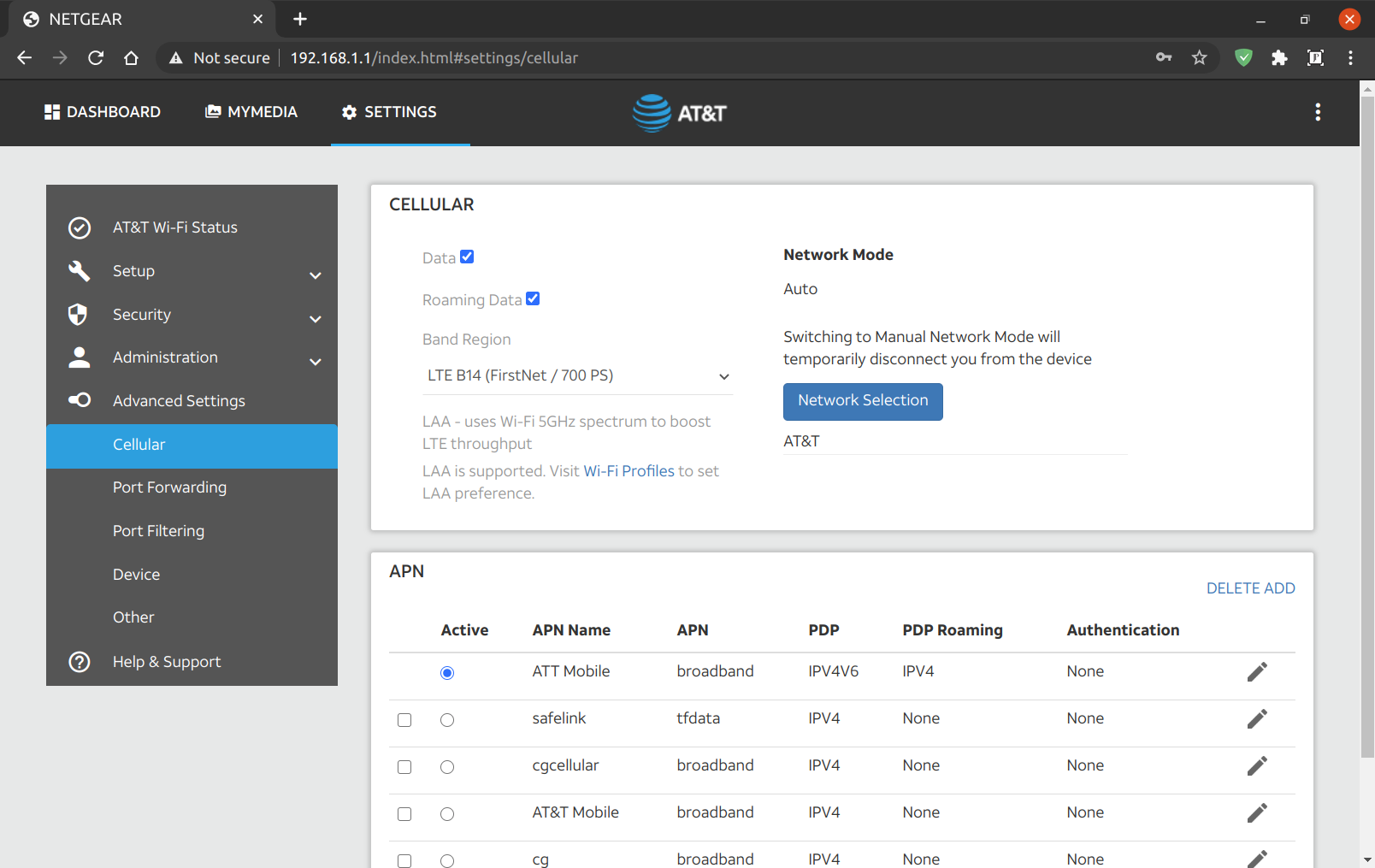
By plugging in the USB to my computer, and telnetting into the M1. I played around with the different LTE bands around my home, and various combinations using carrier aggregation.
#Open a terminal
telnet 192.168.1.1 5510
Edited the band selection dropdown:
AT!gstatus?
AT!band=?
AT!BAND=03,"LTE B2 (1900 MHz PCS)",           0,  2
AT!BAND=04,"LTE B4 (1700/2100 MHz AWS)",      0,  8
AT!BAND=05,"LTE B12 (700 MHz Lower B/C/A)",   0,  800
AT!BAND=06,"LTE B14 (FirstNet / 700 PS)",     0,  2000
AT!BAND=07,"LTE B30 (2300 MHz WCS)",          0,  20000000
AT!BAND=08,"LTE B66 (AWS-3)",                 0,  0,          2
AT!BAND=09,"LTE CA (B2+B4+B12+B14+B30)",      0,  2000280a
You need to reboot the router before the changes show up in the web gui.
I connected to each band individually, and ran a speed test. I then ran a speed test with all bands aggregated. Carrier aggregation with Band 14 doesn’t seem to work. Also, the builtin All LTE option doesn’t seem to choose Band 14. However, when I choose it manually, I get a great connection. Simply locking the device to use Band 14 gave me the best speeds.
LTE Band 14 with WiFi turned off sitting on my desk.

Much better than 0.768Mbps DSL, but not quite broadband.
I took it outside and set it facing the direction of the tower.

Sweet! Broadband Internet. I’ll make an enclosure for it, and run power and ethernet out to it.
I will order a pair of yagis. A type of directional antenna. For even faster speeds. FirstNet public safety LTE in the United States occupies two 10-MHz-wide blocks of spectrum at 758 MHz to 768 MHz (download), and at 788 MHz to 798 MHz (upload). So, I’ll be sure The antennas support those frequencies. The M1 has two external TS9 antenna ports.

Technical Specification
| Frequency Range | 698 – 894 MHz |
| Gain | 8dBi |
| Front to Back Ratio | bigger than 15dB |
| Impedance | 50 ohms |
| VSWR | Less than 1.5 |
| Cable Loss | 0.075 dB |
| Vertical Plane | 72°F ± 5°F |
| Horizontal Plane | 76°F ± 5°F |
| Polarization Type | Vertical or Horizontal |
| Connector Type | SMA Male |
| Number Of Element | 4 |
| Length without Cable | 37 cm |
| Weight | 0.7 Kg |
| Rated Wind Velocity | 150 Mile per Hour |
| Working temperature | -40°F ~ +140°F |
I had to order some SMA ends to shorten the antenna cable. You lose signal for every inch long your antenna cable is. I also ordered SMA to TS9 pigtails, and an outdoor enclosure.
I’ll set them up 90 degrees offset pointing at the same tower. I found my tower location using Opensignal app, then I used Google earth to find the heading. Which was for me 38 magnetic degrees from my house to the tower. I then used a compass app, or google maps to know where to point the antennas. I’m sure it will take some fine tuning. This is a great guide for doing line of sight with Google earth:
https://startyourownisp.com/posts/guide-to-google-earth/
{Speedtest}
There are three ways to use the M1 as a modem. You can connect via ethernet, USB, or WiFi. I found the best performance was wither USB or Ethernet with WiFi off.
#Check IMEI
ati#Restore corrupted IMEI
To unlock your NV:
https://github.com/bkerler/SierraWirelessGen
Installation
- Get python >=3.6 64-Bit~>
- git clone https://github.com/bkerler/edl/ ~>
- chmod +x edl/modem/sierrakeygen.py ~>
- cd edl/modem
- pip3 install -r requirements.txt
at!openlock?
./sierrakeygen.py -l <challenge> -d MDM9x40
AT!OPENLOCK="<generatedresponse>"
at!nvimeiunlock
#at!nvmeidunlock
at!nvencryptimei=xx,xx,xx,xx,xx,xx,xx,x0
#at!nvencryptmeid=xx,xx,xx,xx,xx,xx,xx
atiRight now there is a serious shortage of inexpensive quality Webcams. So, we have to get a bit creative. This setup works great in Linux for OBS, Duo, and Google Meets. It also works for Windows and MacOS. You can always buy a HDMI, OR USB extension cable if you need a longer cable. This setup can also do 1080p at 30fps. I would have loved to have the capture card use USB 3.0, but couldn’t find one for this low price. You can stream from the GoPro Wirelessly, but it adds too much latency for live streaming.
- $25 – Used GoPro Hero 3 White
https://rover.ebay.com/rover/1/711-53200-19255-0/1?ff3=4&toolid=11800&pub=5575164288&campid=5337848787&mpre=https%3A%2F%2Fwww.ebay.com%2Fitm%2FUsed-GoPro-HERO-3-White-1080P-5MP-HD-Sport-Action-Digital-Camera-Camcorder-WiFi%2F333445833543%3Fhash%3Ditem4da2eba347%253Ag%253AFdMAAOSwp2Vd%257EYg9%26LH_BIN%3D1%26autorefresh%3Dtrue - $5 – HDMI to Micro HDMI (D) Cable
https://amzn.to/33IPZzN - $10 – HDMI to USB 2.0 Capture Card
https://amzn.to/33KJDA2

Pros:
Great quality
Wide angle lens
Price
Cons:
There is a very slight delay. Maybe 20-40ms?
There are two cables coming from your Webcam (USB power & HDMI.)
Capture Card Info and Reviews
USB ID: 534d:2109
Chip: MacroSilicon MS2109 ASIC
https://www.cnx-software.com/2020/06/05/11-hdmi-to-usb-2-0-video-capture-dongle-supports-up-to-1080p30-grabbing/
OBS Settings:
https://bigl.es/friday-fun-10-hdmi-to-usb-capture/
- Why do you want to be private? (Threat Model)
- Create list of all your accounts online.
- Search for all your publicly accessible data.
- Compartmentalize your activities (Use unique names, phone numbers, email addresses, and passwords)
- Cleanup your data
- Use open source software
- Keep devices off
- Use the security software below
Privacy Tools: https://www.privacytools.io/
Privacy Podcast: https://inteltechniques.com/podcast.html
- Services:
- Phone numbers:
- Credit card numbers: Capital One temporary credit card #’s eno
- Password Managers: clipperz.is, lastpass.com
- Search: duckduckgo.com
- Email & VPN: Protonmail.com, ProtonVPN.com
- Phone:
- https://arstechnica.com/tech-policy/2020/08/beware-of-find-my-phone-wi-fi-and-bluetooth-nsa-tells-mobile-users/
- Open source OS: LineageOS
- Open source app store framework: Microg, fdroid, etc…
- Firewall: NetGuard
- Anonymizing: Orbot
- Encrypted phone, video, chat: Signal
- Encrypt traffic: ProtonVPN, AdguardVPN, Wireguard
- Secure Email: ProtonMail
- Secure Browser: https://www.androidauthority.com/best-privacy-web-browsers-android-1084899/
- Adblock: Blokada, Adguard
- Bandwidth Monitor: Network Log, Glasswire
- Have your two factor authentication using Google Authenticator on a non primary phone.
- Computer
- OS: Ubuntu or: https://www.privacytools.io/operating-systems/
- Firewall: ufw
- Adblock: Adguard Browser Extension
- Bandwidth Monitor: Vitals Gnome Shell extension
- Secure Browser: Firefox, Brave, etc…
- Anti-malware: ClamAV, chkrootkit, rkhunter, sophos?
- Intrusion Detection (IDS): Tripwire
- Log checker: Logcheck
- Router:
- VPN: Wireguard
- OS: OpenWRT, or Custom Ubuntu
- Adblock: Adguard Home
- Anonymizing: Tor
Rather then setting up Adguard home, and Tor on your local router. I like the idea of just setting up Wireguard to create a VPN to a cloud server that runs Adblock home, and Tor. I call it a secure cloud gateway:
/how-to-set-up-a-secure-internet-gateway-using-wireguard,-tor,-and-adguard-home-on-ubuntu-20-04
It is the only device that both fully supports Google Fi, and Firstnet, and also supports HDMI out. (Requires USB-C to HDMI adapter.)
The Pixel 4 supports both networks, but does not have HDMI out.
Designed for Fi models
From: https://support.google.com/fi/answer/6224695?hl=en
- Pixel 3 and up (North American versions)
- Pixel 2 (North American and rest of world versions)
- Pixel 2 XL (North American and rest of world versions)
- Pixel Model G-2PW4100 (North American version)
- Pixel XL Model G-2PW2100 (North American version)
- LG G7 ThinQ (Unlocked North American versions sold by retailers)
- LG V35 ThinQ (Unlocked North American versions sold by retailers)
- Moto G6 (Unlocked North American versions sold by retailers)
- Moto G7 (Unlocked North American versions sold by retailers)
- Moto G Power & Moto G Stylus (Unlocked North American versions sold by retailers)
- Android One Moto X4 (North American versions)
- Nexus 5X Model LGH790 (North American version)
- Nexus 6P Model H1511 (North American version)
- Nexus 6 Model XT1103 (North American version)
Band LTE 14 Firstnet phones
From: https://www.firstnet.com/content/dam/firstnet/white-papers/firstnet-certified-devices.pdf
- LG LM-V350AWM V35 ThinQ FirstNet Ready Yes
- LG LM-X410AS K30 FirstNet Ready Yes
- LG LM-Q710WA Stylo 4 FirstNet Ready Yes
- LG LM-V405UA V40 FirstNet Ready Yes
- LG LM-G820UM G8 FirstNet Ready Yes
- LG LM-X420AS K40 FirstNet Ready Yes
- LG LM-X320AA Prime 2 FirstNet Ready Yes
- LM-Q720AM Stylo 5+ FirstNet Ready Yes
- LG LM-G850UM G8x Thinq FirstNet Ready Yes 3 LG
- LM-V600AM V60 ThinQ FirstNet Ready Yes
- Google G020I Pixel 4 FirstNet Ready Yes
- Google G020J Pixel 4XL FirstNet Ready Yes
- Motorola XT1922 Moto G6 Play FirstNet Ready Yes
- Motorola Lex L11n FirstNet Ready Yes
I’d like thank ANTHONY NGUYEN @ https://atwing.net for the above article. It really widened my perspective with what could be done with voice commands and smart devices. =] That is where I was introduced to IFTTT, MQTT, and Home Assistant. By connecting them to Google Assistant, you can do ANYTHING with your voice. Like execute bash commands. Adding Discord into the mix you can have all responses read back to you. This allows you to have complete hands free control.
However, The following article is about a simpler way of controlling smart devices. Specifically, a waterproof thermometer, and a smart plug.
I purchased the Unibot WS1 Wireless sensor. Thus creating my own smart weather station that can automatically react to temperature, humidity, ambient light and vibration. The optional UbiBot DS18B20 waterproof sensor allows you to monitor the temperature of liquids as well. If we add a few smart plugs and relays in the mix it will then be able to turn on and off heaters (120v, 240v, 24v, or old millivolt systems), fans, AC, humidifiers, lights, and anything else that can be plugged in. I purchased the https://amzn.to/36YCCdX. Simply because it was the least expensive smart plug on Amazon that was rated for 13 amps, and also supported IFTTT.
In my case, I’d like to use it to monitor my softub, and turn it off when it reaches a certain temperature. Normally this is accomplished by the integrated circuit of the hot tub. However, I had to bypass all that and wire the the 120v AC directly to the heat pump when my circuit boards kept burning out. This also allows me to create other conditions like only heat it during non-peak hours. I have PGE EV rates so it makes a HUGE difference when you use your power.

To accomplish all this I had to install the Ubitbot app, the smart life app. Then configure the two below cloud services:
If This Then That
IFTTT is the free way to do more with hundreds of the apps and devices you love, including Twitter, Dropbox, Evernote, Nest, Fitbit, Amazon Alexa, and Google Assistant.
Apilio
To extend IFTTT you may need to use this.
https://hackernoon.com/what-smart-home-iot-platform-should-you-use-2554ea213df1
We start with a local Ubuntu computer running homemate-bridge to connect to the MQTT broker. We will use Cloud MQTT as a broker to connect our plugs to our Home Assistant. We will be installing Home Assistant on an Ubuntu Google Cloud micro instance. We set up rules @ IFTTT.com to connect it all to Google assistant. A Google home mini is used to accept voice commands. Optionally, we can extend this setup to run any Linux bash command on the local machine. For example turning computers on using wake-on-lan, and off using SSH.
Yonomi
The simple smart home integration platform.
Yonomi makes it easy for innovators to build great apps and devices that connect with the smart home.
DIY
PlatformIO
Tasmota – ESP8266 firmware
https://github.com/arendst/Tasmota
Jeedom
INNOVATIVE HOME AUTOMATION
GET JEEDOM
Losant
RemoteMe
Control and collect data from IoT devices from anywhere around the worldUsing web pages hosted for free and mobile applications fully customisable
EasyIOT Cloud
Our goal is to create secure, reliable and cheap platform for Internet of Things at your home. We will provide DIY tutorials to build IoT using components like Raspbery Pi, Arduino, NRF24L01+, ESP8266 and our EasyIoT Cloud. With help of EasyIoT community we will make IoT world Easy Internet of Things world (EasyIoT) .
EasyIoT framework is not home automation. Of course you can build home automation system, but you can build much more. Do you need advanced alarm system, remote plant irrigation system, solar cell charger control, SMS controlled heater, door opener, hydroponic system or even automation process control system. All this you can easily build with EasyIoT framework.BlynkEasyIoT framework is not home automation. Of course you can build home automation system, but you can build much more. Do you need advanced alarm system, remote plant irrigation system, solar cell charger control, SMS controlled heater, door opener, hydroponic system or even automation process control system. All this you can easily build with EasyIoT framework.
gBridge
gBridge.io: Control anything with voice commands
gBridge’s open interface allows you to integrate Google Home and Alexa easily in your Smart Home.
gBridge is…
…an application, that provides a Bridge between Google Assistant smart home devices and MQTT, an open and available messaging protocol that is supported by many smart home applications and devices.
CloudMQTT
Hosted message broker for the Internet of Things
Perfectly configured and optimized message queues for IoT, ready in seconds.
Adafruit IOBlynkAdafruit IO
The internet of things for everyoneThe easiest way to stream, log, and interact with your data. We play nice with any device. Our simple client libraries work with the most popular devices such as the Adafruit Feather Huzzah, ESP8266, Raspberry Pi, Arduino, and more.
Selfhosted
Blynk
OpenHAB
Home Assistant
Scrypted
All product links are affiliate links.
]]>For the backgrounds to work you;ll need a solid color background. I ordered this green screen: https://amzn.to/2ZhoAkK.
I use Google meets, but this should work with any video conferencing software. (Google meets should be rolling out virtual backgrounds, and blurring in the coming months.) From: https://cloud.google.com/blog/products/g-suite/introducing-some-new-meet-features
Install OBS
sudo snap install obs-studioInstall V4L2
sudo apt install v4l2loopback-dkmsCreate dummy video device, and make is persist across reboots.
create the config file:
nano -w /etc/modules-load.d/obscam.confAdd the below contents:
v4l2loopback devices=1 video_nr=10 card_label="OBS Cam" exclusive_caps=1Next time you reboot the module should be automatically loaded. Manually add the module with the currently running system:
sudo modprobe v4l2loopback devices=1 video_nr=10 card_label="OBS Cam" exclusive_caps=1OBS Plugin obs-v4l2sink
NOTE: This step is no longer necessary in modern version of OBS. As it is now a base feature. You may need to restart OBS to see the new “Start Virtual Cam” button to appear.
You may have to install libobs, and libobs-dev
sudo apt install libobs libobs-devDownload and Compile OBS plugin obs-v4l2sink
sudo apt install qtbase5-dev
git clone --recursive https://github.com/obsproject/obs-studio.git
git clone https://github.com/CatxFish/obs-v4l2sink.git
cd obs-v4l2sink
mkdir build && cd build
cmake -DLIBOBS_INCLUDE_DIR="../../obs-studio/libobs" -DCMAKE_INSTALL_PREFIX=/usr ..
make -j4
sudo make install
Now start OBS Studio and configure the V4L2 video output to /dev/video10 via the new menu item “Tools”->”V4L2 Video Output”:

Add a Chromakey filter.
Here is a good guide: https://gamingcareers.com/guides/green-screen-in-obs-slobs/
Add border, presets, LUTs, transitions, etc…
Add scenes like thank you, thumbs up, screen sharing, other camera angles etc…
Using Google Meet with the Virtual Camera
Start a Google Meet via https://meet.google.com/ and go to settings:

More Reading
Pretty cool virtual background way from scratch: https://elder.dev/posts/open-source-virtual-background/
Another cool virtual background: https://github.com/floe/deepbacksub
I’m also testing Webcamoid: https://webcamoid.github.io/. (Seems to crash quite a bit.)
]]>Parsec is the only option that allows you to play ANY Windows game. You can then stream Geforce Now, Google Stadia, Steam, Epic Games, Origins, and any other standalone windows game. You can also use it as performant remote desktop for CAD or other graphics heavy programs.
It allows you to reduce the framerate to 30fps, the resolution to 1280×720, and the bitrate to 1Mbps. Even though I have “3Mbps” DSL, in the real word it’s more like 2.5Mbps. When I set the bitrate to 2Mbps it saturates my bandwidth sometimes. I found the best was to set bitrate to 1Mbps or 2Mbps depending on the time of day, or if there was anyone else using it.
Create your cloud virtual machine in Azure, and install parsec
From: https://medium.com/azure-cloud/a-killer-guide-for-cloud-gaming-on-azure-march-2020-1aa56d13fba3
- Connecting to the VM with TeamViewer, open a prompt as admin (Start Menu -> search for “cmd” -> right click on command prompt and select Run as Administrator).
- Go to the C:\Program Files\NVIDIA Corporation\NVSMI folder, and run nvidia-smi. This will get you a table that gives you both what mode your Tesla is set to (which will be TCC by default, check under the heading TCC/WDDM), and the GPU_ID, which is the thing under the Bus-Id heading.
- Run nvidia-smi -g {GPU_ID} -dm {0|1} with your Bus-Id and 0 to set it to WDDM, like so (the GPU_ID may differ):
nvidia-smi -g 1:00:00.0 -dm 0
Instead of Teamviewer you can use the open source DWService: https://www.dwservice.net/
If using a different cloud provider, check out:
https://github.com/parsec-cloud/Parsec-Cloud-Preparation-Tool
My parsec config:
# All configuration settings must appear on a new line.
# All whitespace, besides the newline character '\n', is ignored.
# All settings passed via the command line take precedence.
# The configuration file will be overwritten by Parsec when changing settings,
#   so if you edit this file while Parsec is running, make sure to save this file
#   and restart Parsec immediately so your changes are preserved.

# Example:
# encoder_bitrate = 10

app_run_level = 3
app_discord = 0
client_vsync = 0
client_decoder_index = 2
client_decoder_h265 = true
server_resolution_x = 1280
server_resolution_y = 720
encoder_bitrate = 2
encoder_fps = 30
encoder_fps_1 = 30
I installed parsec from: https://parsecgaming.com/downloads/
I use Ubuntu 20.04 and and Nvidia Geforce 1050ti video card. I had to install this tweak to get Parsec to do hardware decoding using libva-vdpau vaapi. I borrowed it from the moonlight project snap.
I got this error when running vainfo to verify the VAAPI-VDPAU wrapper.
vainfo
error: XDG_RUNTIME_DIR not set in the environment.
libva info: VA-API version 1.7.0
libva info: Trying to open /usr/lib/x86_64-linux-gnu/dri/nvidia_drv_video.so
libva info: va_openDriver() returns -1
vaInitialize failed with error code -1 (unknown libva error),exit
My solution was to borrow nvidia_drv_video.so from moonlight, I have not idea why this was not installed with the proprietor nvidia drivers.
sudo snap install moonlight
sudo ln -s /snap/moonlight/current/usr/lib/x86_64-linux-gnu/dri/nvidia_drv_video.so /usr/lib/x86_64-linux-gnu/dri/nvidia_drv_video.so
It used to be part of the vdpau-va-driver package, but that is no longer available on 20.04. It’s replaced by the mesa-va-driver, which does not contain it.
Parsec Shortcuts
From: https://support.parsecgaming.com/hc/en-us/articles/115003632451-Parsec-Shortcuts
CLIENT MENU OPTIONS
- Interact with chat – ctrl + shift + c
- Toggle menu – ctrl + shift + m
- Toggle windowed mode – ctrl + shift + w
- Detach mouse – ctrl + alt + z
- Immersive mode – ctrl + shift + i
EXITING THE STREAM
- Quitting the Mac Application – command + Q or command + W
- Quitting the Windows Application – alt + F4
- Quitting the Raspberry Pi Application – ctrl + alt + ~
- Quitting the Linux Application – ctrl + alt + ~
FRIEND SHORTCUTS
- Allowing access to a friend trying to make a connection who doesn’t have admin access – ctrl + F1 when they try to connect
- Kick everyone from the stream all at once (the panic button!) – ctrl + F3
IMMERSIVE MODE
- Toggling the Windows hotkey passthroughs – ctrl + shift + i
- This allows you to send data to the host when you use ctrl + alt + delete, the Windows button, alt + tab