
National Broadband Map
The new Broadband Map website maintained by the Federal Communications Commission (FCC) is an online tool that allows users to search and compare broadband internet availability and speeds at their specific address. The website provides a wealth of information related to broadband connectivity, including information on broadband providers, types of service available, and connection speeds. Be sure to dispute any carrier that is on this map, but can’t provide you service. Be sure to check that out: https://broadbandmap.fcc.gov/home
NEWSFLASH
https://www.nevadacountyca.gov/CivicAlerts.aspx?AID=6430
 Great news for residents of Nevada County, California! The county is set to streamline compliance with the California Environmental Quality Act (CEQA) to remove barriers and accelerate broadband development, with the final environmental impact report set to be presented before the Board of Supervisors on 28 February. The countywide report, available from 10 February, aims to speed up the granting of federal and state funds to individual fibre projects. The county said construction of the latter could start as early as spring 2023.
 For those interested in accessing the programmatic FEIR, it can be found on the Nevada County Community Development Agency’s website at https://www.nevadacountyca.gov/513/Projects-Supporting-Documents. The PDF report can be directly accessed at https://www.nevadacountyca.gov/DocumentCenter/View/47183/Broadband-Program-Final-Environmental-Impact-Report.
 To stay informed on the latest broadband news, residents can sign up for the Broadband in Nevada County Newsletter at https://www.mynevadacounty.com/broadband. For any questions, concerns, or opportunities to bring service to undeserved areas, connect with the county via email at [email protected].


FREE INTERNET for people with low income
The FCC launched a new program called the Affordable Connectivity Program (ACP) on December 31, 2021. The ACP is a new $14.2 billion program that is part of the Consolidated Appropriations Act of 2021. It is designed to provide low-income households with affordable broadband internet service and connected devices, such as laptops or tablets.
The ACP replaces the Emergency Broadband Benefit program that was launched earlier in 2021. It expands the scope of the Emergency Broadband Benefit program by providing a more comprehensive set of benefits to eligible households. Specifically, the ACP provides eligible households with a $30 monthly discount on broadband service and up to $100 off a connected device, such as a laptop or tablet. The program also covers the cost of installation and provides ongoing technical support to help ensure that households are able to take advantage of the benefits provided by the program.
Eligibility for the ACP is based on income and participation in certain assistance programs, such as Medicaid or the Supplemental Nutrition Assistance Program (SNAP). Eligible households can enroll in the program through participating broadband providers or directly through the ACP website.
The goal of the ACP is to provide affordable and reliable broadband internet access to low-income households, thereby helping to bridge the digital divide and promote greater economic opportunity and social equity. The program is expected to provide critical support to millions of households across the United States and help to ensure that they have access to the tools and resources needed to participate fully in the digital economy.
ACP eligible providers that provide a $0 with ACP plan:
TREELINK Fixed Wireless – Looking for affordable internet? Check out Treelink’s distributed mesh fixed wireless! 
 They offer a $0 plan with ACP eligibility. Sign up at http://treelink.us/ to enjoy internet connectivity. Treelink uses Althea blockchain technology to make internet available to residents near Nevada City. The service area uses ADI (AT&T Dedicated Internet), and Comcast as exit nodes.


AT&T DSL – Get connected to the internet with DSL ATT! With ACP eligibility, you can get their $0 plan and enjoy reliable internet connectivity. Check out their offerings at https://www.att.com/help/affordable-connectivity-program/.
PCSFORPEOPLE LTE Cellular – Get affordable internet and technology options from @pcsforpeople!  They offer mobile hotspot-based internet service using the T-Mobile network, with unlimited 4G LTE and up to 23GB/month of high-speed prioritized data. After 23GB, heavy data users may experience slower speeds due to data deprioritization. Plus, you can snag a laptop for just $10 www.pcsforpeople.org.
Other low income Internet programs:
- Comcast – http://www.internetessentials.com/ $10/month
- ATT- https://accessatt.solixcs.com/#/home $5-$10/month
- Suddenlink – https://www.alticeadvantageinternet.com/ $15/month
- Cellular Human-I-T https://hitconnect.org/sales/buyInternet?product=6616 $15/month
Complete List of Available Internet Options
List is sorted by relative speed, and type.
Fiber Internet (synchronous)
Pros:
- Very fast and reliable speeds, both upstream and downstream
- Good for heavy internet usage, such as streaming and online gaming
- Future-proof technology that can handle increasing demands
Cons:
- Can be expensive, especially for higher speeds
- Limited availability in some areas due to infrastructure requirements
- Vulnerable to damage from construction and natural disasters
| Provider | Service Area | Notes | Signup Link |
|---|---|---|---|
| AT&T ABF | Metro | Shared: Best option if available. | N/A |
| AT&T ADI/MIS | Most places | Dedicated: Very expensive. | N/A |
| Vast Networks | Coverage map | Middle-mile project funded by ARRA, can be better price than ADI. Not sure about last mile. | https://vastnetworks.com/ |
| Race Communications | Hwy 174 to Airport in Grass Valley | Goes down often, well priced. Speeds are much slower than advertised. | https://www.race.com/ |
| Newtown Fiber | Newtown Rd. | N/A | |
| Nevada County Fiber | Banner Mountain | Accepts ACP. | https://www.nevcofiber.com/ |
| Northern Sierra BBP | Buck Mountain Road, Oak Drive, Arianna Court, Sunset View Court, and Mountain Park | The Northern Sierra Broadband Project (Not built yet) | N/A |
| Spiral Fiber | North of Nevada City limits | (Not built yet) | https://www.spiral.com/ |
| Plumas Sierra | Truckee | https://www.plumassierratelecom.com/ |
Cable Internet
Pros:
- Faster speeds than DSL
- Generally more widely available than fiber
- Often bundled with TV and phone services
Cons:
- Speeds can be affected by network traffic
- Connection speeds can vary depending on location
- Not as reliable or fast as fiber
| Provider | Service Area | Notes | Signup Link |
|---|---|---|---|
| Comcast (Xfinity) | Grass Valley, Nevada City, Penn Valley areas | https://www.xfinity.com/ | |
| Comcast Business | Same as above | https://business.comcast.com/ | |
| SuddenLink | Alta Sierra, parts of south county, Truckee areas | https://www.suddenlink.com/ |
Fixed Wireless
Pros:
- Can be a good option for rural areas where other types of internet are not available
- Can be more affordable than other types of internet
- Can be installed quickly
Cons:
- Can be affected by weather, terrain, and other factors
- Can have slower speeds and less reliability than fiber or cable
- Limited availability in some areas
| Provider | Service Area | Notes | Signup Link |
|---|---|---|---|
| Treelink | Outside of Nevada City | Althea Distributed mesh. Uses ADI (AT&T Dedicated Internet) and Comcast as exit nodes. | https://treelink.us/ |
| Digital Path | Western Nevada County up to 5-Mile House | No data limits. | https://digitalpath.net/ |
| Smarter Broadband | Some parts of Western Nevada County | https://www.smarterbroadband.net/ | |
| Succeend.net | Lake Wildwood? | https://www.succeed.net/ | |
| Exwire | Truckee? | https://www.exwire.com/ | |
| Colfax.net | Colfax & parts of Hwy 174 area to Grass Valley | https://www.colfax.net/ | |
| GoSkyWest | Lime Kiln, McCourntney, Wolf Rd., and more | https://goskywest.com/ |
Low Earth Orbit Satellite Internet
Pros:
- Can be a good option for rural areas where other types of internet are not available
- Fast speeds and low latency
- Can be used anywhere with a clear view of the sky
Cons:
- Can be affected by weather and other factors
- Can be expensive, especially for heavy internet usage
- Limited availability and long waitlists in some areas
| Provider | Service Area | Notes | Signup Link |
|---|---|---|---|
| Starlink | Current round is sold out in our area. RV edition also sold out in our area. | https://www.starlink.com/ |
5G Cellular Internet
Pros:
- Fast speeds and low latency
- Can be used anywhere with 5G coverage
- Can be bundled with other cellular services
Cons:
- Limited coverage in some areas
- Can be affected by network congestion and other factors
- Can be expensive for heavy internet usage
| Provider | Service Area | Notes | Signup Link |
|---|---|---|---|
| AT&T | Not available yet in our area | N/A | |
| T-Mobile | Not available yet in our area | N/A | |
| Verizon | Not available yet in our area | N/A |
4G & LTE Cellular Internet
Pros:
- Can be used anywhere with cellular coverage
- Can be bundled with other cellular services
- Portable and easy to use
Cons:
- Can be expensive for heavy internet usage
- Slower speeds and higher latency than other types of internet
- Limited coverage in some areas
| Provider | Service Area | Notes | Signup Link |
|---|---|---|---|
| Verizon | Hotspot | https://www.verizon.com/ | |
| AT&T | Hotspot | https://www.att.com/ | |
| T-Mobile | Hotspot | https://www.t-mobile.com/ |
DSL (aDSL) or U-verse
Pros:
- Can be more affordable than other types of internet
- More widely available than fiber
- Can be bundled with phone services
Cons:
- Speeds can be affected by distance from the provider
- Not as reliable or fast as fiber
- Limited availability in some areas
| Provider | Service Area | Notes | Signup Link |
|---|---|---|---|
| AT&T Internet | Grass Valley, Nevada City, Penn Valley, Truckee | Digital Pair Gain from a fiber connected terminal. ACP eligible. | N/A |
Geosynchronous Orbit Satellite Internet
Pros:
- Can be used anywhere with a clear view of the sky
- More widely available than Low Earth Orbit satellite internet
- Can be bundled with other satellite services
Cons:
- Higher latency and slower speeds than other types of internet
- Can be affected by weather and other factors
- Limited availability in some areas
| Provider | Service Area | Notes | Signup Link |
|---|---|---|---|
| Viasat | Also known as Exede or Wildblue. Viasat-2 satellite launched in 2017. Viasat-3 satellites in development. | https://www.viasat.com/internet | |
| HughesNet | https://www.hughesnet.com/ | ||
| Skycasters | VSAT services for enterprise and government customers. | https://www.skycasters.com/ |
Legacy Providers
- [wiki]Fiber Internet[/wiki] (synchronous)
- AT&T ABF (AT&T Business Fiber) Shared : The BEST option if available.
SERVICE AREA: Metro - AT&T ADI (AT&T Dedicated Internet) aka MIS (Managed Internet Service) ATT Dedicated Business Fiber (Available many places, but very expensive) ~$500/month for 10Mbps ~$2300/month for 1Gbps symmetrical up to 10Gbps
SERVICE AREA: Most places - Vast Networks http://vastnetworks.com Coverage map
A middle-mile project that had been funded by the American Recovery and Reinvestment Act (ARRA)
NOTES: Can be a better price than ADI, like $1000/month for 1Gbps symetrical.
Not sure about last mile. - Race Communications race.com (Zone 1 has been completed)
SERVICE AREA: On Hwy 174 to Airport in Grass Valley
NOTES: Goes DOWN many times a week! Speeds are much slower than advertised. Is well priced at ~$100/month for 1Gbps symmetrical. - Newtown Fiber? (VAST)
SERVICE AREA: Newtown rd.
- Nevada County Fiber (ATT) ACCEPTS ACP!
SERVICE AREA: Banner Mountain
https://www.nevcofiber.com/ - The Northern Sierra Broadband Project (Not built yet) (ATT)
SERVICE AREA: Buck Mountain Road, Oak Drive, Arianna Court, Mountain View Court, Sunset View Court, and Mountain Park Court, in unincorporated Grass Valley - Spiral Fiber (Not built yet) (Vast)
https://www.spiral.com/
SERVICE AREA: north of the Nevada City limits in the Lake Vera Purdon Road and North Bloomfield Road neighborhoods - plumassierratelecommunications.com
SERVICE AREA: Truckee
- AT&T ABF (AT&T Business Fiber) Shared : The BEST option if available.
- [wiki]Cable Internet[/wiki]
- Comcast (Xfinity)
SERVICE AREA: Grass Valley, Nevada City, Penn Valley areas - Comcast business
SERVICE AREA: same as above - SuddenLink
SERVICE AREA: Alta Sierra, parts of south county, Truckee areas
- Comcast (Xfinity)
- [wiki]Fixed Wireless[/wiki]
- Treelink – distributed mesh
Signup here: http://treelink.us/
Althea blockchain technology http://althea.net/ SERVICE AREA: Outside of Nevada City NOTES: Uses ADI (AT&T Dedicated Internet), and Comcast as exit nodes.
- Digital Path
SERVICE AREA: Western Nevada County up to 5-Mile House - Smarter Broadband
SERVICE AREA: Some parts of Western Nevada County - Succeend.net
SERVICE AREA: (Lake Wildwood?) - exwire.com
SERVICE AREA: (Truckee?) - colfax.net
SERVICE AREA: Colfax & parts of Hwy 174 area to Grass Valley - goskywest.com
SERVICE AREA: Lime Kiln, McCourntney, Wolf Rd., and in south Alta Sierra, Golden Oaks, the Cottage Hill area off Running M, Lake of the Pines and the Ranchos.
- Treelink – distributed mesh
- 5G [wiki]Cellular Internet[/wiki] (Not available yet in our area)
- AT&T
- T-Mobile
- Verizon
- [wiki]Low Earth Orbit[/wiki] [wiki] Satellite Internet[/wiki]
- Starlink Current round is sold out in our area. RV edition also is sold out in our area. Waitlist is until 2023.
- 4G & LTE [wiki]Cellular Internet[/wiki] Hotspot
- Verizon
- AT&T
- T-mobile
- Oasisbroadband? (Resells ATT and T-mobile)
- or third party resellers of the above networks… Check out all your options here:
https://en.wikipedia.org/wiki/List_of_United_States_mobile_virtual_network_operators
- [wiki]DSL[/wiki] (aDSL) or [wiki]U-verse[/wiki] (aDSL2+ or vDSL)
- AT&T Internet – U-verse (aDSL2+) Digital Pair Gain from a fiber connected terminal. ACP eligible.
Third party ATT resellersOmsoft in Davis (Subcontracts to SonicNet)
SERVICE AREA: Grass Valley, Nevada City, Penn Valley, and Truckee areas
No data limits
AT&T DSL Legacy (Shutting down June 30th 2022)Copper from the main office (No longer available from ATT in many places)
- [wiki]Geosynchronous Orbit[/wiki] [wiki]Satellite Internet[/wiki]
(!low on list because of High Latency realtime interaction is delayed)- Viasat (aka Exede aka Wildblue)
- Hughsnet
- VSAT – https://www.skycasters.com/
3G[wiki] Cellular Internet[/wiki] Hotspot (Average 600Kbps – 1.4 Mbps and up to 3.1 Mbps)
ATTENTION: All carriers are disabling 3G by 2022.Verizon,
AT&T,T-mobile,or third party resellers…
[wiki]ISDN[/wiki] – Integrated Services Digital Network
Not sure this still exists…[wiki]56K Modem[/wiki] over AT&T phone lineother third partyATT
Coverage Maps
As you can see, https://www.nevadacountyca.gov/1460/Local-Broadband-Providers-Coverage-Maps, needs some updating.
California coverage map: https://www.broadbandmap.ca.gov/
Federal coverage map: https://broadbandmap.fcc.gov/.
(Hopefully, this should be more accurate by the end of Summer 2020: https://www.benton.org/blog/congress-tells-fcc-fix-broadband-maps-now)
Background
Many in Nevada County live outside the city centers. Combined with the varied terrain, and heavy forests. This makes finding a reliable and fast internet connection sometimes exceedingly difficult.
Broadband internet is currently defined by the FCC as 20Mbps down and 3Mbps up with latency of less than 100ms. More recently it has been mentioned by California as 25Mbps down and 25Mbps up with latency suitable for real time interaction.
Only Fiber and Cable offer upload speeds that high. Fixed wireless, and occasionally 4G LTE Cellular can offer adequate download speeds. If possible, Fiber and Cable are the top choices for speed and reliability. There are many areas in Nevada County that do not have any internet options or can only access internet over unreliable high latency satellite, cellular or wireless connections. This is a huge issue. Part of the problem is that many ISPs (Internet Service Providers) are misreporting areas served. Or, reporting that they serve the whole block if they serve a single house within the block. Also, many ISPs try to block new companies or municipalities from serving these misreported areas. As well as cause problems for new ISPs getting grants.
https://gizmodo.com/new-report-suggests-fcc-massively-overstated-gigabit-co-1845842681
There are currently many grants, and bills in the works to expand broadband into rural areas like Nevada County. Much of this is overseen by The California Public Utilites Commision (CPUC): https://www.cpuc.ca.gov/Communications/
Using the California Coverage Map, you can see which areas are supposedly served, and what speeds you should get. You can also see which areas are eligible for two of these grant programs; the California Advanced Services Fund (CASF) Infrastructure Grant, and the Connect America Fund Phase II. The CASF has a local presence through the Sierra Business Council called the Gold Country Broadband Consortium. Nevada County has a page with some of the projects they have worked on regarding to broadband
here: https://www.mynevadacounty.com/1433/The-Countys-Role.
The rural digital opportunity fund is also in the works. There are may be some more grants coming with this bill too:
https://www.engadget.com/house-approves-100-billion-broadband-funding-010021883.html
More recently there have been a bunch of reverse auctions by the FCC to disburse grant funds. The newest round of rural broadband grant winners interactive map: https://experience.arcgis.com/experience/0b324cabf7b94d9ca34caa9361122d94/
Some info from: https://www.nevadacountyconnected.com/wp-content/uploads/2019/05/NevadaCounty-InternetAccess-June2019.pdf
Here is a spreadsheet of the above data: https://docs.google.com/spreadsheets/d/1-zEAGucrrkgLL9jWyW8w2XvtHmrJuvMNb9PwUQsrHAU/edit?usp=sharing
More Reading
Also check out this http://www.nevadacountyconnected.com/broadband-pricing.
More reading: https://thesungazette.com/article/news/2020/05/06/rural-residents-are-left-disconnected/
Get Involved!
http://www.internetforallnow.org/
asfi sheheen http://netequity.net
Apply here: https://www.safelinkwireless.com/
safelinkwireless.com by tracfone
There are many companies that provide lifeline cellular to people with low income, but in my opinion Safelink gives you the best plan. Tracfone like many cellular companies resell AT&T, Verizon, and T-mobile. In Nevada County they will send you a T-mobile SIM card by default. If you need AT&T, or Verizon you can call and get them to send you a new AT&T or Verizon SIM card. If you would prefer to use your existing phone instead of the cheap smart phone they send you, you can opt for the BYOD option.
Lifeline is the federal program that subsidizes phone service for people with low income. It was created quite a while ago for land line phones. Safelink offers that plus the new $50 pandemic subsidy for internet by removing the data limit.
SafeLink Wireless®
SAFELINK WIRELESS® is a program provided by TracFone Wireless, Inc. serving eligible households. To participate in the SAFELINK WIRELESS® service, certain eligibility requirements must be met, which are set by each State where the service is provided. These requirements are based on a person’s participation in state, Federal support programs, or by meeting the Income Poverty Guidelines as defined by the U.S. Government. SAFELINK WIRELESS® service is limited to one person per household.
TracFone Wireless is the largest “No-Contract” cellular service provider in the U.S. with over 20 million subscribers. It is also a subsidiary of América Móvil S.A.B. de C.V. (‘AMX’) (BMV: AMX; NYSE: AMX; Nasdaq: AMOV; LATIBEX: XAMXL), the 9th largest phone company in the world, as well as in all of the Americas, with more than 250 million wireless subscribers.
from: https://www.safelinkwireless.com/Enrollment/Safelink/en/Web/www/default/index.html#!/aboutUs
]]>Broadband: 25Mbps down, 3Mbps up, and less than 100ms latency.
Neither fiber nor cable is available where I live. All the fixed wireless providers in Nevada County don’t serve my property. AT&T will provide me a DSL line running at the insanely slow speed of 768kbps. That’s around 90 Kilobytes per second download, and don’t get me started on upload. Although, better than a 56K modem, it’s not fast enough for my needs. Geosynchronous satellite’s latency is too high for real time interaction. Low earth satellite is not available yet. AT&T is the only cellular provider with adequate coverage, however only on the new LTE band 14, all the other bands are spotty. FirstNet LTE Band 14 has been installed all over the Country by AT&T funded by a giant grant from the Federal government. My options are really quite limited. Luckily, I did eventually find something that works. Check out all the internet options in Nevada County here:
https://jphein.com/internet-options-in-nevada-county/
Here is a list of phones that have this LTE band 14:
https://www.firstnet.com/devices/phones.html
A complete list of devices is here:
https://www.firstnet.com/content/dam/firstnet/white-papers/firstnet-certified-devices.pdf
AT&T does not offer an inexpensive unlimited plan (<$100/month). Thus began my search for someone that did. I started out searching the Wiki article of all the MVNOs. (Mobile Virtual Network Operators) All the folks that resell time on the 4 major USA networks. I sorted it by the network column so I could filter all the AT&T MVNOs: https://en.wikipedia.org/wiki/List_of_United_States_mobile_virtual_network_operators
Then I found the article below,
https://www.rvmobileinternet.com/gear/att-unlimited-rental-plans/
which pointed me to:https://www.cgcellular.com/ Which provides unlimited data on AT&T for $60. Definitely the least expensive I’ve found. *No longer offering this. Instead check out how to get unlimted data for free here: jphein.com/lifeline
All AT&T Wireless unlimited plans supposedly deprioritize your data if your local cell tower is congested after 22GB. I don’t think it happens much in rural areas.
I purchase the Netgear Nighthawk M1 (MR1100) directly from my local AT&T store. Although, now you can buy one used on eBay.
Be sure to get the MR1100-2A1NAS model. The first consumer model does not support band 14. Read about it here: https://community.netgear.com/t5/Mobile-Routers-Hotspots-Modems/Pre-April-Nighthawk-and-band-14-and-46/m-p/1555303#M5746
It supports all LTE bands that AT&T uses. It was ~$270 with tax purchased outright. I put it on the $10/month for 100MB BYOD business plan. They waived any activation fee. I was able to unlock it after 60 days, and discontinued the original $10 plan.
https://www.att.com/deviceunlock/unlockstep1
Although, not necessary to unlock it for any AT&T reseller. I unlocked it in case in the future I need to use it with T-mobile, or Verizon.
Although currently locked to AT&T, I can use it with any AT&T MVNO by changing the APN setting from the web gui.
http://attwifimanager/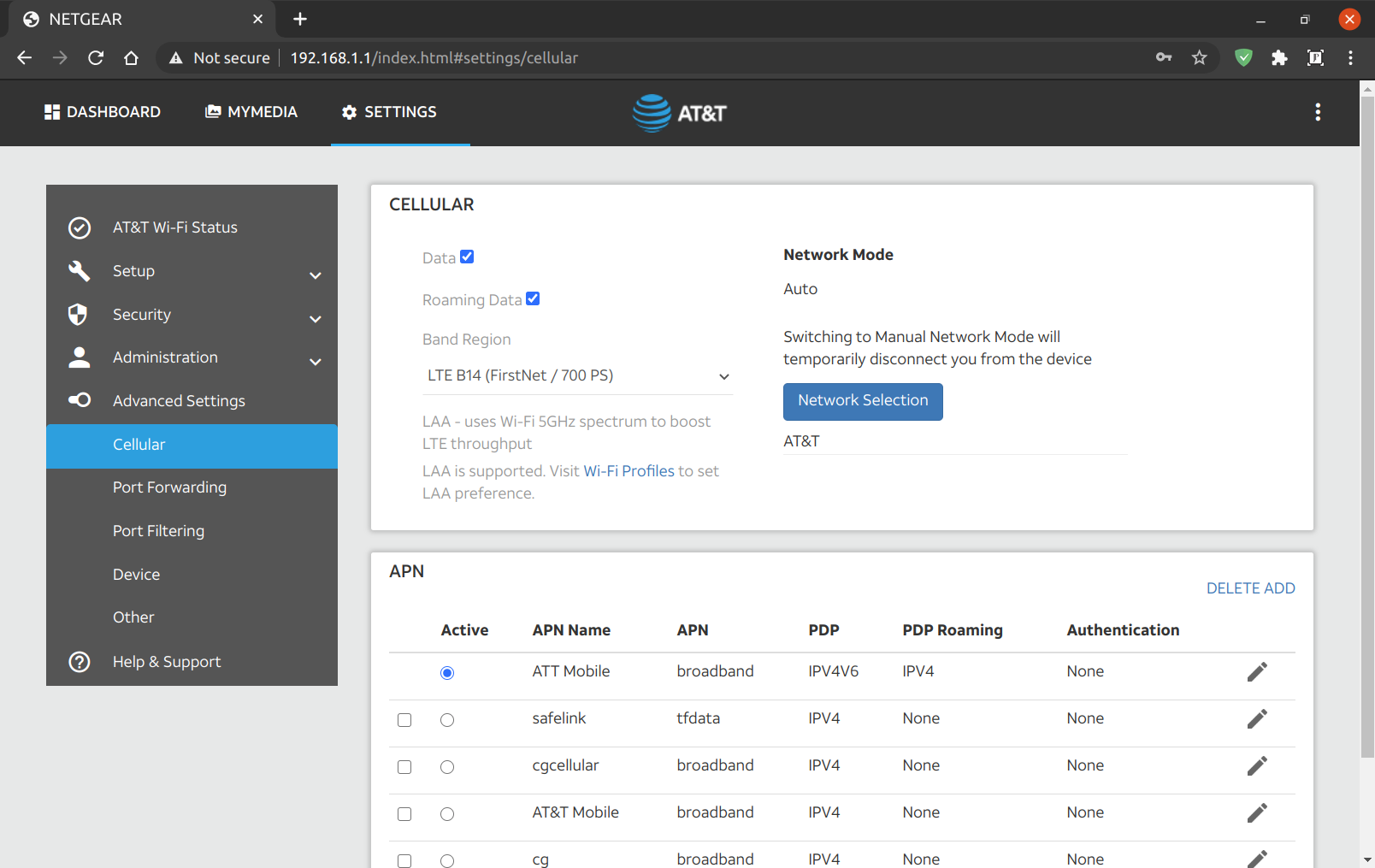
By plugging in the USB to my computer, and telnetting into the M1. I played around with the different LTE bands around my home, and various combinations using carrier aggregation.
#Open a terminal
telnet 192.168.1.1 5510
Edited the band selection dropdown:
AT!gstatus?
AT!band=?
AT!BAND=03,"LTE B2 (1900 MHz PCS)",           0,  2
AT!BAND=04,"LTE B4 (1700/2100 MHz AWS)",      0,  8
AT!BAND=05,"LTE B12 (700 MHz Lower B/C/A)",   0,  800
AT!BAND=06,"LTE B14 (FirstNet / 700 PS)",     0,  2000
AT!BAND=07,"LTE B30 (2300 MHz WCS)",          0,  20000000
AT!BAND=08,"LTE B66 (AWS-3)",                 0,  0,          2
AT!BAND=09,"LTE CA (B2+B4+B12+B14+B30)",      0,  2000280a
You need to reboot the router before the changes show up in the web gui.
I connected to each band individually, and ran a speed test. I then ran a speed test with all bands aggregated. Carrier aggregation with Band 14 doesn’t seem to work. Also, the builtin All LTE option doesn’t seem to choose Band 14. However, when I choose it manually, I get a great connection. Simply locking the device to use Band 14 gave me the best speeds.
LTE Band 14 with WiFi turned off sitting on my desk.

Much better than 0.768Mbps DSL, but not quite broadband.
I took it outside and set it facing the direction of the tower.

Sweet! Broadband Internet. I’ll make an enclosure for it, and run power and ethernet out to it.
I will order a pair of yagis. A type of directional antenna. For even faster speeds. FirstNet public safety LTE in the United States occupies two 10-MHz-wide blocks of spectrum at 758 MHz to 768 MHz (download), and at 788 MHz to 798 MHz (upload). So, I’ll be sure The antennas support those frequencies. The M1 has two external TS9 antenna ports.

Technical Specification
| Frequency Range | 698 – 894 MHz |
| Gain | 8dBi |
| Front to Back Ratio | bigger than 15dB |
| Impedance | 50 ohms |
| VSWR | Less than 1.5 |
| Cable Loss | 0.075 dB |
| Vertical Plane | 72°F ± 5°F |
| Horizontal Plane | 76°F ± 5°F |
| Polarization Type | Vertical or Horizontal |
| Connector Type | SMA Male |
| Number Of Element | 4 |
| Length without Cable | 37 cm |
| Weight | 0.7 Kg |
| Rated Wind Velocity | 150 Mile per Hour |
| Working temperature | -40°F ~ +140°F |
I had to order some SMA ends to shorten the antenna cable. You lose signal for every inch long your antenna cable is. I also ordered SMA to TS9 pigtails, and an outdoor enclosure.
I’ll set them up 90 degrees offset pointing at the same tower. I found my tower location using Opensignal app, then I used Google earth to find the heading. Which was for me 38 magnetic degrees from my house to the tower. I then used a compass app, or google maps to know where to point the antennas. I’m sure it will take some fine tuning. This is a great guide for doing line of sight with Google earth:
https://startyourownisp.com/posts/guide-to-google-earth/
{Speedtest}
There are three ways to use the M1 as a modem. You can connect via ethernet, USB, or WiFi. I found the best performance was wither USB or Ethernet with WiFi off.
#Check IMEI
ati#Restore corrupted IMEI
To unlock your NV:
https://github.com/bkerler/SierraWirelessGen
Installation
- Get python >=3.6 64-Bit~>
- git clone https://github.com/bkerler/edl/ ~>
- chmod +x edl/modem/sierrakeygen.py ~>
- cd edl/modem
- pip3 install -r requirements.txt
at!openlock?
./sierrakeygen.py -l <challenge> -d MDM9x40
AT!OPENLOCK="<generatedresponse>"
at!nvimeiunlock
#at!nvmeidunlock
at!nvencryptimei=xx,xx,xx,xx,xx,xx,xx,x0
#at!nvencryptmeid=xx,xx,xx,xx,xx,xx,xx
atihttps://en.wikipedia.org/wiki/Link_aggregation
Broadband bonding is a type of channel bonding that refers to aggregation of multiple channels at OSI layers at level four or above. Channels bonded can be wired links such as a T-1 or DSL line. Additionally, it is possible to bond multiple cellular links for an aggregated wireless bonded link.
Previous bonding methodologies resided at lower OSI layers, requiring coordination with telecommunications companies for implementation. Broadband bonding, because it is implemented at higher layers, can be done without this coordination.[24]
Commercial implementations of Broadband Channel Bonding include:
- Mushroom Networks’ Broadband Bonding Service [25]
- Connectify’s Speedify fast bonding VPN – software app for multiple platforms: PC, Mac, iOS and Android [26]
- Peplink’s SpeedFusion Bonding Technology [27]
- Viprinet’s Multichannel VPN Bonding Technology [28]
- Elsight’s Multichannel Secure Data Link [29]
- Synopi’s Natiply Internet Bonding Technology [30]
My journey for usable internet from worse to best on unstable lines:
Speedify on RPi -> OpenMPTCProuter(best of all for TCP only + aggregate) -> borrowed Peplink -> Glorytun UDP (bad with packet loss, even at 1% limiter) -> ExitLag -> Engarde (no aggregation), finally done 
Bonding without aggregation
From: https://github.com/porech/engarde
Site to Site Bonding
https://blog.muthuraj.in/2020/06/high-throughput-site-to-site-vpn-using.html
Ubiquity Edgerouter X on both ends
Load-balancing:
Ubiquity Edgerouter X
OpenWRT MWAN3
https://github.com/bertrandmartel/openwrt-mwan-config
- extract root.zip
- ./rootscript
- sudo adb install MOTODX2_Bootstrap_signed.apk
- cm10-01272013-unofficial-mx2.zip
- gapps-jb-20121011-signed.zip
- Data and Cache wipe
- MX2_CM9_WIFI.zip
- i/o schedule to deadline
- 16bit transperancy
- Turn “Window Animation Scale” to OFF.
- Turn “Transition Animation Scale” to OFF.
- Turn “Animator Duration Scale” to OFF.
Thank you!
https://forum.xda-developers.com/showthread.php?t=2101633
https://forum.xda-developers.com/showthread.php?t=1914238
]]>A very confusing topic! Don’t worry I figured it out. =] I will go over topics such as: Networks, Coverage, Technology, Resellers, Roaming, Lifeline (Free low income smart phone and monthly service), Prepaid, Cellphone hardware, Unlocking, Voice over IP (VOIP), Credo Mobile, Google Voice, Google Fi, Republic Wireless & Freedompop. All in the context of living in Nevada County.
Networks: There are four major networks in the USA: Verizon, ATT, T-mobile, and Sprint. I will refer to these 4 as networks.
Coverage: They all have different coverage in different areas. In order to be sure which is best for you, you can consult their maps. ask people you know, use aggregate crowd-sourced coverage map apps (Like OpenSignal or Sensorly), or test the different networks yourself.
Technologies: On top of the four networks they mainly use two wireless technologies 3g and 4g. (simplified; reality is much more complicated with different frequencies being used for most networks and technologies). Most networks have, or are in the process of shutting down their 2G networks. (AT&T shut its 2G GSM network down on December 31, 2016.[5] ). The coverage can be very different for these as well. Very old phones don’t use 4g, and some very new phones don’t use 3g. I will call these technologies.
Resellers: To further complicate the issue. There are hundreds of companies that resell service on these networks, usually for cheaper. These are called MVNOs or Mobile Virtual Network Operators. I will call these providers, resellers, carriers, or companies. What complicates it further is that resellers like Straight talk actually resell service on all four networks. They pick one for you based on either your location or the phone they want to sell you. More info here:
https://en.wikipedia.org/wiki/List_of_United_States_wireless_communications_service_providers
One really mystifying piece is that if you are one of the hundreds of resellers of these four major networks, a stipulation of your service agreement is that you cannot tell your customer which network/s you are reselling. They also don’t disclose their roaming partners. As a customer you have to figure that out yourself. One great resource is Wikipedia. A page I’ve contributing to quite a bit. =] Especially in the low income lifeline section for California. You can find the company you’re wondering about here:
https://en.wikipedia.org/wiki/List_of_United_States_mobile_virtual_network_operators
Roaming: In addition every company may have different roaming partners as well. This means that if your phone is compatible, and the networks are compatible you may hop networks when you don’t have your primary network available. Only If your carrier and that carrier are partners. Some have no roaming partners. Some charge you for roaming. Some don’t.
Lifeline: If you are low income, you can get a free smart phone and service on whichever network you prefer. Through the lifeline program that was started way back for landlines. Find a service to sign up for here:
https://en.wikipedia.org/wiki/List_of_United_States_mobile_virtual_network_operators#California
Nevada City: For instance where I live, ATT 4g works well. ATT 3g not well. Verizon 3G works ok. Verizon 4g not at all. Sprint 3g works intermittently. Sprint 4g not at all. T-mobile no go. So for me, a reseller of ATT 4g is best. In downtown Nevada City, all four networks seem to work, although T-mobile probably the worst. I haven’t tested in a while. Once you find out which network works best for you at home, traveling, and your day 2 day. I think it’s best to pick a reseller that matches your politics. Credo Mobile is committed to donating a large portion of their profit to charitable causes you get to vote on. They use the Verizon network now.
Prepaid: Prepaid phone just refers to whether of not your provider bills you in advance, or after the month of usage is over. Many companies offer both options. With a postpaid plan you run the risk of being charged exorbitant amounts of money if you go over your quota. With a prepaid plan, your service shuts off if you reach your quota, unless you buy more.
Cellphone hardware: Then there is the phone itself. not all phones work with all networks and technologies. It has to do with what the the radios installed and which electromagnetic frequencies the radios support. Some modern phones have all the radios in them. However, you have to swap a SIM card if you want to switch networks. Apple is working on a smart sim card, so you can use all the networks without swapping sim cards. To figure out which frequencies (technologies) your phone supports use a service like phonearena.com.
Unlocking: Some phones have been crippled or software “Locked” to a specific network even though the have the necessary hardware to work with others. Sometimes you can get the original company that sold the crippled phone to “Unlock” it.
VOIP: Most modern phones and cell phone carriers also offer voice and text over wifi. This can be called VOIP. This means that if you don’t have any coverage, or spotty coverage you can do your calling and texting over any available wifi network. The Google Fi project and Republic Wireless seamlessly swaps you from wifi, cellular and their roaming partners. Where as before your call would be disconnected as you switched networks. AT&T, Verizon, T-mobile, and Sprint are jumping on the bandwagon, but usually charge you extra for the service, and cannot seamlessly swap your call between cellular and wifi. Most modern voice communication is actually VOIP. Google Voice gives you a free virtual phone number with unlimited voice and texting. You can communicate from any internet connected device.
What do I use? I use a reseller of ATT 4G network, Freedompop for my cell phone service. They give me free service of up to 200MB/month per SIM card. They offer exactly zero customer support, and constantly try to trick you into upgrading to a paid service. It’s perfect for me. With google voice and freedompop I do all my communication over wifi or free cellular data. I have two landlines, my desktop, my laptops and a bunch of smartphones all hooked up to that number. I love typing my text messages. They are all connected to the internet. My landlines connect to a little box that is connected to the internet. My phone bill is $0. I pay $45/month for unlimited internet at home through Spiral internet. They are a local reseller of ATT DSL. I use Comcast cable internet at work.
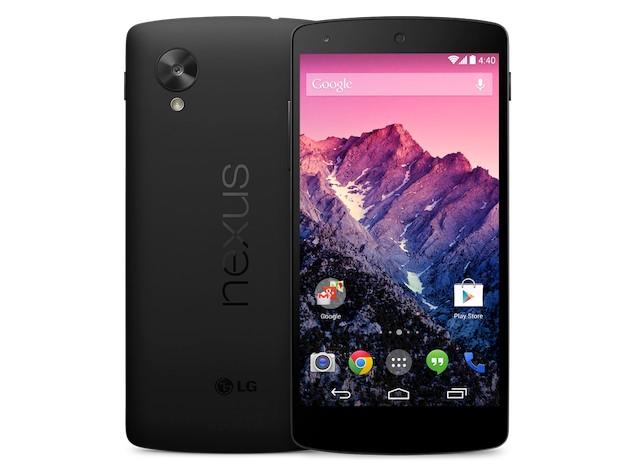
$99 + $9.99 shipping. No taxes or other fees. I disabled all paid trials. Instructions are below.
The big reason I choose Android vs iPhone (iOS) is the fact that I can have free WiFi hotspot tethering on any carrier. Apple allows the carrier to disable this hardware in order to charge you for this service. Some android devices also disable this feature unless enabled by the carrier. Luckily the Nexus 5 from Freedompop is not one of those. I did have to follow this guide to fix the Android OS myself.
https://thecellphoneguru.com/faqs/how-to-get-tethering-wifi-hotspot-to-work-on-your-lg-nexus-5/
The reason I choose to buy it directly from Freedompop, was because I was already planning on activating with them to take advantage of the 1G/month free 4G (Sprint) data plan. They charge $20 to BYOD if you don’t buy it from them. Also, I’d have to find the correct Sprint ICCID SIM card. The device comes preactivated with the correct SIM card if you buy it from them directly. There is no way I could find a good condition Nexus 5 with Sprint SIM card for only $80. So it was a great deal.
I also purchased their $0.25 Global SIM card for 700MB/month free 3G (ATT & T-mobile) data plan. That way since all Nexus 5’s are unlocked, I can always pop that SIM in if I need ATT or T-mobile coverage, OR if I run out of data. I ordered a number of these just in case. At $0.27 a pop, I figured it was worth it. Link to purchase is included in article below. [jbox color=red]Read this entire article to disable all paid trials. I did this for my Nexus 5 CDMA account, and my Global SIM accounts.
FREE cell phone service by Freedompop on the AT&T, Sprint and T-mobile networks! Free shipping.
[/jbox]
The LG Nexus 5 will not work with Verizon. However, you do get all the 3 other major networks (AT&T Sprint, and T-mobile). The Verizon iPhone 5C is the phone I would get If I wanted an iPhone with Verizon coverage. It comes unlocked as well. Also, Sprint has added it to their whitelist. That means the Verizon iPhone 5C out of the box can now be activated on all 4 major carriers! Or any of their MVNO’s except for the Sprint MVNO Freedompop’s CDMA service. =[ They have not updated their whitelist to reflect Sprint’s yet. If you, like me want to use Freedompop, I’d buy an unlocked Sprint iPhone 5C.
Next phone I’ll get will probably be a Verizon Nexus 6. They also have the ability to use all 4 networks. And you can sign up for Google Fi. With Google Fi, you get to automatically swap between At&t, Sprint, T-mobile, US Cellular, and WiFi. Plus international carriers. I think At&t coverage is included because of addition to the Three network which includes AT&T as it’s roaming partner. Note: Need to research this. Anyone want to send me a Nexus 6 or Nexus 5x?
[jbox color=blue]Here is my guide on how to Unlock the bootloader, install a custom recovery, and root the Nexus 5. I needed to do this in order to change the name of my phone. Here is my guide for that. Note: this process requires you to perform a factory reset.[/jbox]
Speed test on the Free Freedompop 4G LTE (Sprint) network:

]]>

Personally, I have my phone in Airplane mode most of the time. I use Wifi whenever available, often Wifi hotspots are much closer than cell towers. That way my wifi radio is radiating less powerfully than the cellular radio would be. I use a headset, handset, or speaker phone whenever possible. I try to make sure my phone is not close to or touching myself or anybody else. Especially when airplane mode is off. You can try this little trick for automating the process of turning airplane mode on whenever you are connected to WiFi.
https://www.fcc.gov/general/specific-absorption-rate-sar-cellular-telephones
https://en.wikipedia.org/wiki/Microwave
Microwaves are a form of electromagnetic radiation with wavelengths ranging from one meter to one millimeter; with frequencies between 300 MHz (100 cm) and 300 GHz (0.1 cm).[1][2] This broad definition includes both UHF and EHF(millimeter waves), and various sources use different boundaries. In all cases, microwave includes the entire SHF band (3 to 30 GHz, or 10 to 1 cm) at minimum, with RF engineering often restricting the range between 1 and 100 GHz (300 and 3 mm).
aka inWatch Z2G
This guide is written for the original inWatch Z that came with Andriod 4.2.2, and has the bone conductivity speaker. Not the later version (Z3G) that shipped with Android 4.4. These instructions may work with the later one, but I have not tested it.
Chipset: MediaTek (MTK) MT6572 Why does it identify as a MT6227 via USB?
Specs: RAM: 1GB, ROM: 8GB, CPU: Dual Core,1.2GHz,Cortex-A7
WIFI: 802.11b/g/n wireless internet
GSM Cellular Frequencies: 2G 850/900/1800/1900MHz
GPS: Yes
Bluetooth: Yes
OS: Android 4.2.2
Price: $291.81 http://www.gearbest.com/cell-phones/pp_70817.html
Info: http://inwatchusa.com/
XDA thread: www.xda-developers.com?
Review: http://martian-imperium.blogspot.com/2014/07/one-week-with-inwatch-z.html
This smart watch is a pretty powerful little machine. If it was rooted and had Google play on it, I could use for all sorts of stuff. Unfortunately, it did not come with those features. The goal of this post to root this device, install a custom recovery, and install Google Play.
NOTE: There is an issue with the stock lock screen. After following this guide, you may have a your watch rebooting everytime you try to unlock it. To solve this issue, read this thread:
http://forum.xda-developers.com/smartwatch/other-smartwatches/inwatch-z-day-one-to-factory-t2984378
Required equipment:
- inWatch Z smart watch, and snap on charger.
- Ubuntu laptop (Works with MacOS or Windows as well. I used Ubuntu Linux 16.04 xenial.)
- A Windows virtual machine, or an actual Windows machine.
- Micro USB cable.
- A WIFI internet connection.
- ADB tools for your OS (In Ubuntu type “apt-get install android-tools”
Guide:
- Download all files needed here: https://goo.gl/H8zIcm to your Ubuntu laptop.
To root:
Navigate to kingoapp.com on your inWatchZ.

Download the app for Android, and run the kingoapp. (As many times as it takes)
Worked! Holysmokes! I had to run it twice. o_o
Once it is successful continue on to the next step.
2.This step requires a Windows machine. I used a Windows 10 virtual machine under KVM. Virtualbox, VMWare and a Windows box all work.
To install custom recovery, so we can install Google Play. Follow the below guide.
https://devs-lab.com/clockworkmod-for-all-mediatek-device.html
to verify if you’ve successfully installed the recovery issue:
adb reboot recovery
You should see the CWM recovery screen. Press the power button to reboot.
Once you’ve verified that you can boot into recovery then continue.
3. Install Flashify APK to install Google Apps!
NOTE:
http://forum.xda-developers.com/showthread.php?p=54028344&highlight=welcome#post54028344
Let me save somebody some time! REMOVE OneTimeInitializer.apk and SetupWizard.apk! Otherwise, you’ll get this annoying “Welcome” and be soft bricked there, since the “OK” button was hard coded to dimensions greater than the screen size. Ugh.
- Connect to Wifi
- Install flahify apk from the download link above.
- Navigate to the Superuser app and give flashify acccess to root without asking (asking is incompatible with the small screen)
- Install Google Apps 4.2.2 <choose google apps 4.2.2> from within the flashify app. Have it download the recovery and write it to your watch.
It worked!
4. I’ve got Google Play installed. However the welcome choose language screen is not compatible with such a small screen. so…… (in a terminal issues the below commands)
adb shell
ps |grep com.google.android.setupwizard
u0_a102   886   132   312336 30676 ffffffff 40087a90 S com.google.android.setupwizard
kill 886
Make sure you replace the 886 with whatever the PID on your watch is.
It worked!
5. Now I can install any other app I need. =]
For example:
- Teamviewer Host So I can remote in to the inWatchz with my laptop or phone and input passwords and any other thing that is awkward on the inwatchz keyboard. I also use it to manage applications and processes.
- Google Voice and Hangouts for making free wifi calls and texts.
- Fleksy, and Google keyboard for a keyboard that easier to use than the stock one. Keemple
- IP Webcam for Android to use the watch as a small wireless video camera.
- Portable Wifi Hotspot So I can share the Z’s cell connection with my laptop.
- Set Orientation for allowing rotation of the screen.
- Tiny cam monitor for monitoring your webcams.
- Pandora for listening to tunes.
- Google Maps and GPS essentials.
- Cyril Preiss’ SWApp Link
- OpenMic+
- CPUspy
- Titanium Backup
- Awesome On Off Smart Screen (Grandmaster Tools)
- Mobdro
- Gravity box
- fqrouter2 (to make the inWatch Z a wifi repeater/extender) Link to come
Here is a MTK Tools backup of my inWatchZ rooted, with CWM custom recovery, and Google play installed.
Patched 4.2.2 for inWatch Z
Also, you can install the stock firnware for Kitkat 4.4 from inWatch.cc for inWatch Z
I’m now looking at the CWM recovery on my inWatchZ. The only problem is there is no volume control so, I cannot navigate within the recovery. =[
Now I’m in search of a touch recovery for the MT6572.
Tried with flashify the following recoveries for the MT6572:
http://tutfix.blogspot.com/2015/05/new-touch-recovery-cwm-clockworkmod-for.html
no worky
http://www.mediafire.com/download/iwlq1lavp3938l3/CTRv2.4.7z
No worky
http://www.mtkroms.com/2015/03/philz-touch-recovery-for-all-mtk-devices.html
http://www.mediafire.com/download/87ag7139go6macd/XoLo_A500S_PhilZ_recovery.img
No worky
I’ll try this one next:
https://devs-lab.com/twrp-recovery-for-all-mediatek-phones.html
Next step: Try spflash below:
To flash the new touch recovery:
https://androidmtk.com/smart-phone-flash-tool
Someone else is also looking for this:
http://nox4developper.blogspot.se/2014/12/request-for-touch-recovery-help-inwatch.html
Here is a guide on how to install the custom recovery with MTK tools. If I find it, and flashify and spflash do not work.
http://forum.xda-developers.com/showpost.php?p=38337401&postcount=5
A list of compatible custom roms for the MT6572
https://devs-lab.com/list-of-all-custom-custom-roms-for-mediatek-mtk6572-ext4-ubifs.html
If you need to modify an app windows size, because it’s not compatiple with the screen use:
- Compatibility mode in settings.
- Smaller font size.
- Finally if those fail:
http://repo.xposed.info/module/de.robv.android.xposed.installer
With Module: App Settings Module, to adjust the dpi of Sim Card Apk to around 95. Tinker with it until everything is visible.
If everything has gone horribly wrong. Use this guide to restore your inWatch Z:
https://devs-lab.com/how-to-unbrick-mediatek-device.html
Custom clock faces
Install .zip’s without root:
Make sure you have a folder called “inwatchupdate” on the Z
Make sure the is an update.zip in the inwatchupdate folder
Go to “Settings”
Go to “About Phone”
Go to “Local Update”
Select “Install”
Follow the onscreen instructions
Device will reboot, leave it alone
The update will finish
Device will reboot again
Done
Factory reset
Do NOT do this:
adb shell wipe data; adb reboot;
You will unable to get past the welcome screen. AND adb will be disabled. Only thing you can do is spflash it back to your last mtk-tools backup or stock rom.
WARNING!!!:
When used SPFlash do not “Format all and download”
I did this, and now I have a totally useless bracelet.
]]>